You have audio and video files. You have subtitle files: SRT, VTT, or LRC. You want to play them together, see the full transcript, and click any line to jump straight there.
That's what SubSeeker does.
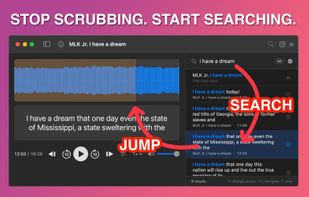
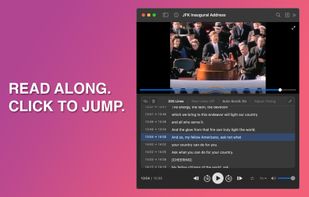
Most players treat subtitles as a video-only afterthought. SubSeeker puts subtitles front and center. Load an audio file with its matching subtitle, and you get a waveform player with every line of the transcript displayed alongside it. Load a video file, and you get a video player with the same interactive transcript. The current line highlights as playback advances. Click any other line, and playback jumps to that exact moment.
No workarounds. No converting SRT to LRC so a music player will show your text. No toggling a "visualization mode" just to see subtitles on an audio file. It just works.
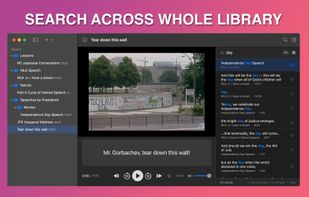
Search is where SubSeeker stands apart. Type a word or phrase and find every occurrence, not just in the file you're playing, but across every subtitle file in your library. Click a result, and that file opens at the exact timestamp where those words appear. If you have dozens of podcast episodes, lecture recordings, or interview transcripts, you can find any moment across all of them in seconds.
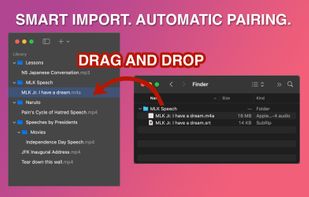
Your library is built from your existing folders. Drag a folder from Finder into SubSeeker, and it creates a virtual link. Your files stay where they are. Nothing gets copied or moved. SubSeeker automatically pairs media files with subtitle files that share the same filename. Add new files to your folders anytime, and they show up in your library automatically.
Free to try with up to 3 media files. A one-time purchase unlocks unlimited files.
Supported subtitle formats: SRT, VTT, LRC, ASS, SSA.
Supported audio formats: MP3, AAC, M4A, WAV, AIFF, FLAC, OGG, OPUS, and more.
Supported video formats: MP4, MOV, AVI, MKV, MPEG, VOB, and more.










No comments or reviews, maybe you want to be first?