A fast, GPU-accelerated disk-usage treemap for Linux. It maps your whole filesystem as nested rectangles sized to what they actually consume, so the space hogs jump out instantly. Then right-click anything for a plain-English “safe to delete?” verdict — with the exact cleanup command for your distro. Built in Rust, MIT licensed, no telemetry.
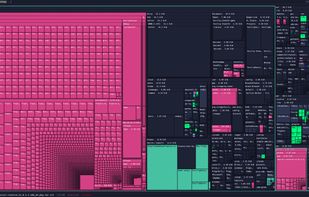
Storage Sifter draws a squarified treemap — every file and folder becomes a rectangle whose area is proportional to the space it uses. Big things look big. A 745 MiB shared library, a 555 MiB cache, a folder full of game assets — they own the screen, while thousands of tiny files politely collapse into the texture. Click any cell to drill in, Ctrl/Shift-click to select, right-click for actions. The breadcrumb bar is always your current path; the live scan stat shows item count and elapsed time.
“Safe to delete?” — an honest answer, not a guess.
Finding the big folder is half the job. Knowing whether you can delete it is the half that actually scares people. Right-click any file or folder and Storage Sifter gives you a verdict in plain language, with the reasoning behind it:
- A clear verdict — e.g. Probably keep
- A classification (e.g. Personal media)
- The full path and the size on disk
- The signals it used to decide (“Inside your home directory”, “Personal media is usually irreplaceable”)
- When something is reclaimable — a package cache, a build dir — it tells you so
- You stay in control the whole time: Move to Trash for the reversible choice, Delete permanently for the deliberate one, - or just close the dialog and walk away. The tool advises; you decide. It will never quietly delete anything.
How it works.
Squarified treemap
It sizes every node and lays the result out so rectangles stay close to square — readable even when one folder dwarfs the rest. Area = disk usage, always.
Rust · egui/eframe · wgpu/Vulkan
Rendering runs on your GPU through wgpu (Vulkan), with the UI on Rust's egui/eframe — which is why panning, drilling, and rescanning stay smooth on filesystems with millions of items.
Local-only & honest
Classification and the safe-to-delete heuristics run on your machine. No account, no cloud, no telemetry. When it suggests a cleanup it hands you the right command for apt, pacman, or dnf — to run yourself.
Is there a WinDirStat or SpaceSniffer for Linux?
Storage Sifter stands on the shoulders of tools a lot of people already love. Each is great at what it does — these are different goals, not a takedown. If you live in the terminal, ncdu is still wonderful; baobab is a clean, built-in option. Storage Sifter's bet is one specific combination.
Storage Sifter is a Linux-native alternative to SpaceSniffer and WinDirStat: a GPU-accelerated live treemap, color-coded by file type, with the deletion-guidance step the others leave to you.
Report a bug or request a feature?
GitHub: open an issue (or a pull request) at https://github.com/Fopull-LLC/StorageSifter.






 Fopull added Storage Sifter as alternative to Disk Space Saver, Spacie, O&O DiskStat, Disk Graph and 33 more
 Fopull added Storage Sifter as alternative to UtilStudio Disk Space Finder
 Fopull added Storage Sifter as alternative to TDP x-Ray and FilePro


No comments or reviews, maybe you want to be first?