Stackyard icon
Stackyard icon

Stackyard

Stackyard is a free, open-source desktop app for Windows and Mac that shows every SDK, toolchain and framework version on your computer, which of your projects use each one, and what's safe to remove.
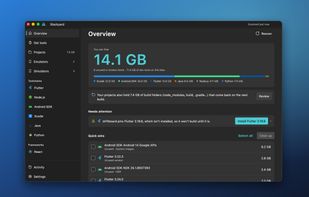
The Overview: what you can free, what needs attention, and the quick wins.

Cost / License

  • Free
  • Open Source (MIT)

Application type

Platforms

  • Windows
  • Mac
0likes
0articles
Save

Features

Properties

Features

Highlights All activities

Stackyard News & Activities

Recent activities

Stackyard information

AlternativeTo Categories

OS & Utilities, Development

GitHub repository

  •  0 Stars
  •  0 Forks
  •  0 Open Issues
  •   Updated  
View on GitHub
Stackyard was added to AlternativeTo by Aqib Javed on and this page was last updated .

No comments or reviews, maybe you want to be first?

Official Links

What is Stackyard?

Stackyard is a free, open-source desktop app for Windows and Mac that shows every SDK, toolchain and framework version on your computer, which of your projects use each one, and what's safe to remove.

Version managers like FVM, nvm, pyenv and SDKMAN are good at installing versions. None of them tells you that you have six Flutter SDKs, three Android NDKs and a 13 GB emulator you haven't started in a year. Stackyard scans your machine and your project folders, reads the files projects pin versions in (.fvmrc, .nvmrc, package.json, Gradle files, .python-version, global.json), and marks the versions nothing uses.

Problems come with a fix button: a project that pins a Flutter version you don't have, a JAVA_HOME pointing at a deleted folder, dead PATH entries, or a Java too new for a Flutter app's Gradle. Each is explained in plain words, and you see every step before it runs.

It also clears build, node_modules, .dart_tool and Pods folders in projects you haven't touched in months, manages Android emulators and iOS simulators, and installs any version of Flutter, Node, Java, Python, Go, Rust and more straight from the publisher, checked against their hash.

Removals go to the Recycle Bin or Trash, and Stackyard never edits your projects. Everything runs locally, with no account and no telemetry. MIT licensed.