
SSD Fresh icon
SSD Fresh icon

SSD Fresh

 6 likes

Extends the lifetime of the SSD and prevents wear and tear.
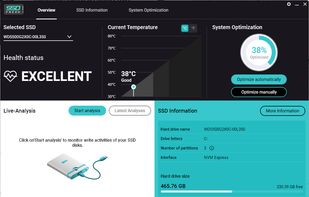
SSD Fresh screenshot 1

Cost / License

  • Freemium (Subscription)
  • Proprietary

Since

  • Since 2015

Platforms

  • Windows
6likes
0articles
Save
Highlights All activities

SSD Fresh News & Activities

Recent activities

  • TheEmperorArt updated SSD Fresh
  • TheEmperorArt updated SSD Fresh
  • TheEmperorArt updated SSD Fresh
  • TheEmperorArt updated SSD Fresh

SSD Fresh information

  • Developed by

    DE flagAbelssoft
  • Licensing

    Proprietary and Freemium product.
  • Pricing

    Subscription that costs up to $3 per month + free version with limited functionality.
  • Alternatives

    6 alternatives listed
  • Badge

    Get an embeddable badge for SSD Fresh
  • Supported Languages

    • English
    • Spanish
    • French
    • Hungarian
    • Italian
    • Russian
    • Slovak
    • Turkish
    • Korean
    • Japanese
    • Romanian
    • Portuguese
    • Polish
    • Dutch
    • Norwegian Bokmål
    • Greek
    • Czech
    • German
    • Danish
SSD Fresh was added to AlternativeTo by AllFreeware on and this page was last updated .

No comments or reviews, maybe you want to be first?

Featured in Lists

Windows

I use these software on my Windows 10 Systems
By Richard Rothacker31 appsUpdated

Official Links

Install from the command line

  • winget install -e --id Abelssoft.SSDFresh

Be careful what you paste into a terminal. Check what a command installs before running it.

What is SSD Fresh?

Extends the lifetime of the SSD and prevents wear and tear.

Real-time protection SSD Fresh informs about the condition of the SSD in real time so that a timely reaction can be taken in the event of a critical condition.

S.M.A.R.T.-Analysis Self-monitoring, analysis and reporting technology provides a detailed analysis of the SSD based on condition data.

Temperature display The temperature display shows immediately whether the SSD is running too hot and whether measures need to be taken.

Single-Click Optimization With just one mouse click, the system settings are optimally adjusted, resulting in a longer lifetime of the SSD.

Detailed overview of relevant SSD information Number of hours used, write operations and more: SSD Fresh shows all important data of the SSD for optimal hard disk care.

Live analysis of write operations to the SSD Monitor the write activities on the SSD and clearly display the programs with the most data consumption

LIMITATIONS IN THE FREE VERSION Contribution request screens, no background watcher