
Splat Markdown Editor icon

Splat Markdown Editor

 Like

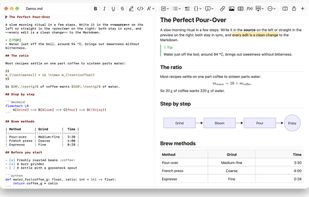
Splat is a native Markdown editor for macOS, written in Rust on AppKit. The source and a live preview sit side by side, and both are editable: type in the source, or fix a sentence straight in the rendered preview.
Splat Markdown Editor screenshot 1

Cost / License

  • Free
  • Open Source (MIT)

Application type

Since

  • New

Updated

  • Updated Oct 2026

Platforms

  • Mac
0likes
0articles
Save

Features

Properties

Features

Highlights All activities

Splat Markdown Editor News & Activities

Recent activities

Splat Markdown Editor information

  • Developed by

    Sven Müller
  • Licensing

    Open Source (MIT) and Free product.
  • Written in

  • Alternatives

    8 alternatives listed
  • Badge

    Get an embeddable badge for Splat Markdown Editor
  • Supported Languages

    • English
    • Catalan; Valencian
    • Czech
    • Danish
    • German
    • Spanish
    • Finnish
    • French
    • Croatian
    • Hungarian
    • Indonesian
    • Italian
    • Malay
    • Dutch
    • Norwegian
    • Polish
    • Portuguese
    • Romanian
    • Slovak
    • Slovene
    • Swedish
    • Turkish
    • Vietnamese

AlternativeTo Category

Office & Productivity

GitHub repository

  •  3 Stars
  •  0 Forks
  •  0 Open Issues
  •   Updated  
View on GitHub

Popular alternatives

View all
Splat Markdown Editor was added to AlternativeTo by Sven-Mueller on and this page was last updated .

No comments or reviews, maybe you want to be first?

Official Links

What is Splat Markdown Editor?

Splat is a native Markdown editor for macOS, written in Rust on AppKit. The source and a live preview sit side by side, and both are editable: type in the source, or fix a sentence straight in the rendered preview. Every preview edit becomes the smallest possible change to the Markdown, so untouched lines stay byte-for-byte identical and Git diffs stay clean.

Splat understands CommonMark, GitHub Flavored Markdown, GitHub alerts, Obsidian wiki links, embeds and callouts, Pandoc and Typora extensions, embedded HTML, LaTeX formulas (with a visual formula editor), and Mermaid, Graphviz and PlantUML diagrams, all rendered offline without Java, a server or a network connection. Documents export to PDF, HTML and Word.

It is a real Mac app: windows, tabs, menus, Versions, Auto Save, the share menu, dark mode, spell checking, dictation and VoiceOver. No Electron. A keystroke in a 10 MB document takes about 25 ms.

Free and open source under MIT or Apache-2.0, signed and notarized. Requires macOS 14 or later on Apple Silicon.