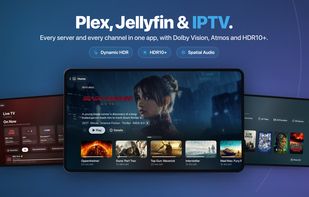
Plex, Jellyfin and your IPTV playlist in one app. Spectati puts your media servers and your live channels in one library on Apple TV, iPhone, iPad and Mac. Your XMLTV data becomes a full guide, and files reach your display and your receiver without re-encoding.
ONE LIBRARY
Connect Plex, Jellyfin, IPTV playlists, SMB shares and Emby (beta) at the same time. A film that sits on two servers shows up once, and Spectati plays the better copy, judged by resolution, codec, HDR and audio. Search covers titles, episodes and live channels from every source. Spectati writes your progress back to the server, so you can stop on one device and pick up on another.
LIVE TV WITH A REAL GUIDE
Paste an M3U, M3U8 or JSON playlist, or connect an Xtream provider. You get now and next, categories and a timeline you can scroll. SD, HD and 4K feeds of the same channel group under one entry. Hide, rename, sort and pin channels, and your changes survive a playlist refresh. On Apple TV you can zap up and down without leaving the player. On iPad, Mac and Apple TV, Multiview plays up to four channels at once.
SPORTS (BETA)
Follow leagues and teams in football, basketball, ice hockey, tennis, motorsport and more, and Spectati finds their matches in your IPTV source's XMLTV guide. Subscribers get kickoff reminders, Watch from Kickoff on catch-up channels and Matchday Multiview.
PLAYBACK
High-bitrate 4K remuxes direct-play, with no server transcoding. Dolby Vision, HDR10+, HDR10 and HLG go to the display. Dolby Atmos, TrueHD, E-AC-3 and DTS go to the receiver. Adjust audio delay and subtitle timing. Subtitles come from OpenSubtitles, live channels carry DVB teletext, and IntroDB skips the intro.
NATIVE ON EVERY APPLE DEVICE
Written in Swift for tvOS, iOS, iPadOS and macOS 26 or later. Spectati follows the current Apple TV user, so everyone in the house keeps their own watch history. Families get a PIN lock and age-rating caps.
FREE TO USE
No ads and no card. Connect up to two sources and you get live TV with the full guide, 4K remuxes in SDR and channel curation. Four Blender open movies on Home let you try the player before you connect anything.
FEATURES
• Continue Watching, watch history, watchlist and favorites
• Like or Not For Me on anything, and Home rows that follow your ratings
• Chapters, playback speed and audio modes
• AirPlay and Picture in Picture
BRING YOUR OWN CONTENT
Spectati is a player and organizer. It does not provide media, channels, IPTV subscriptions, playlists, accounts, metadata, subtitles, storage or internet access. Connect your own supported providers and only stream content you're authorized to access.






 EU
EU


 Jacob Søndergaard


No comments or reviews, maybe you want to be first?