

SpaceBrowser icon
SpaceBrowser icon

SpaceBrowser

SpaceBrowser scans a folder or volume and displays its contents as a size-proportional treemap, making large files and directories easy to identify.
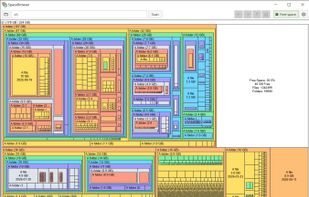
SpaceBrowser UI

Cost / License

  • Free
  • Open Source (MIT)

Application type

Platforms

  • Windows
  • Linux
  • Mac
0likes
0comments
0articles

Features

Properties

  1.  Privacy focused
  2.  Lightweight

Features

  1.  Portable
  2.  Works Offline
  3.  Delete Temporary Files
  4.  No registration required
  5.  No Tracking
  6.  Ad-free
  7.  Cross-Platform
  8.  Golang

SpaceBrowser News & Activities

Highlights All activities

Recent activities

SpaceBrowser information

  • Developed by

    FR flagKiord
  • Licensing

    Open Source (MIT) and Free product.
  • Written in

  • Alternatives

    19 alternatives listed
  • Supported Languages

    • English

AlternativeTo Categories

OS & UtilitiesSystem & Hardware

GitHub repository

  •  13 Stars
  •  1 Forks
  •  2 Open Issues
  •   Updated  
View on GitHub
SpaceBrowser was added to AlternativeTo by Kiord on and this page was last updated .
No comments or reviews, maybe you want to be first?

What is SpaceBrowser?

SpaceBrowser scans a folder or volume and displays its contents as a size-proportional treemap, making large files and directories easy to identify.

Inspired by SpaceMonger 1.4, SpaceBrowser is a free, cross-platform, open-source disk space analyzer and an alternative to WinDirStat, WizTree, TreeSize, DaisyDisk, and SquirrelDisk

Features:

SpaceBrowser recreates the main features of SpaceMonger 1.4 in a modern, cross-platform application.

Visualization and scanning:

  • Size-proportional treemap for files and folders
  • Optional free-space node for scanned volumes
  • Configurable small-file aggregation threshold
  • Live scan progress, time estimate, and cancellation
  • Exclusions for paths, hidden files, symlinks, and network filesystems

Navigation and actions:

  • Treemap navigation with Back, Forward, Parent, and Root commands
  • Hover details with full path, byte size, modification date, and system icon
  • Open, Open with, and filesystem Properties actions
  • Optional move-to-trash command with confirmation and rescan

Customization:

  • Rectangle color palettes, scale, shape and shading
  • Rebindable keyboard shortcuts
  • Persistent settings

Platforms:

  • Windows and Linux support
  • macOS build available but not yet tested

Official Links

