
SoundLatch icon
SoundLatch icon

SoundLatch

 Like

SoundLatch is a Windows audio manager that automatically selects devices based on your priorities. Lock your preferred headphones, speakers, or microphone to prevent unwanted switching—all from the system tray.
SoundLatch screenshot 1

Cost / License

  • Pay once
  • Proprietary

Platforms

  • Windows
0likes
0articles
Save

Features

Highlights All activities

SoundLatch News & Activities

Recent activities

SoundLatch information

  • Developed by

    CA flagForm and Element
  • Licensing

    Proprietary and Commercial product.
  • Pricing

    One time purchase (perpetual license) ranging between $10 and $13.
  • Alternatives

    4 alternatives listed
  • Badge

    Get an embeddable badge for SoundLatch
  • Supported Languages

    • English
    • French
    • Spanish
    • Arabic
    • Chinese
    • Persian
    • Portuguese
    • German
    • Italian
    • Turkish
    • Icelandic
    • Russian
    • Hindi
    • Urdu
    • Korean
    • Japanese
    • Indonesian

AlternativeTo Categories

Audio & Music, Gaming Software
SoundLatch was added to AlternativeTo by thirdcoolest on and this page was last updated .

No comments or reviews, maybe you want to be first?

Official Links

What is SoundLatch?

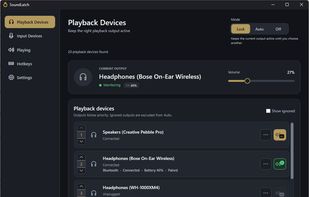
SoundLatch is a Windows audio manager that gives users control over which headphones, speakers, and microphones their computer uses. It combines automatic device switching, customizable priority lists, and device locking to keep audio settings consistent as devices connect and disconnect.

Users can set separate priority orders for playback and recording devices. In Auto mode, SoundLatch selects the highest-priority available device. For example, headphones can take precedence when connected, with speakers serving as the fallback when the headphones are unavailable. Microphone selection works independently, allowing users to keep a preferred microphone while switching between audio outputs.

Lock mode keeps a selected device in place while it remains available, helping prevent other devices from taking over. This is useful for maintaining a consistent setup during calls, gaming, or everyday listening. Playback and microphone modes can be configured separately, so one can switch automatically while the other stays locked.

SoundLatch provides access to its controls from the Windows system tray, reducing the need to repeatedly open Windows sound settings. Volume memory helps preserve preferred listening levels when switching between devices.

By combining automatic selection with the option to enforce a specific device, SoundLatch supports both flexible and fixed audio setups. It is designed for users who regularly move between headphones, speakers, headsets, and microphones and want their audio choices to follow a predictable set of preferences.
