Snipfolio icon
Snipfolio icon

Snipfolio

Snipfolio turns raw screenshots into clean, shareable mockups. Drop in a screenshot and draw crop regions on it. Snipfolio will snap each crop to the right aspect ratio for desktop, mobile, or browser frames.
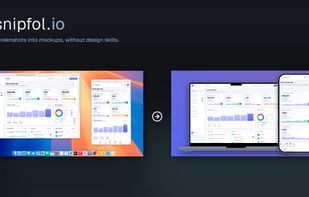
Screenshots into mockups, without design skills.

Cost / License

  • Freemium (Pay once)
  • Proprietary

Platforms

  • Online
1like
0comments
0articles

Features

Properties

  1.  Lightweight

Features

  1.  Custom overlays
  2.  Dark Mode
  3.  Ad-free
  4.  No Tracking
  5.  No Coding Required
  6.  Upload Screenshot
  7.  Annotate Screenshot
  8.  No registration required
  9.  Full-page Screenshot
  10.  Image exporting

Snipfolio News & Activities

Highlights All activities

Recent activities

Snipfolio information

  • Developed by

    CA flagNeferent
  • Licensing

    Proprietary and Freemium product.
  • Pricing

    One time purchase (perpetual license) that costs $5 + free version with limited functionality.
  • Alternatives

    10 alternatives listed
  • Supported Languages

    • English

AlternativeTo Category

Photos & Graphics
Snipfolio was added to AlternativeTo by neferent on and this page was last updated .
No comments or reviews, maybe you want to be first?

What is Snipfolio?

Snipfolio turns raw screenshots into clean, shareable mockups. Drop in a screenshot and draw crop regions on it. Snipfolio will snap each crop to the right aspect ratio for desktop, mobile, or browser frames. Compose multiple snips into a single image with custom backgrounds, gradients, and captions then export as PNG in one click.

Built for developers, PMs, and indie makers who need polished screenshots for PRs, documentation, app store listings, or portfolio pages without opening Figma or learning a design tool.

Key features:

  • Draw multiple crop regions on a single screenshot
  • Automatic aspect-ratio snapping to device frame sizes
  • Desktop, mobile, and browser device frames
  • Custom backgrounds (solid color, gradient, or image)
  • Captions under device frames
  • Multi-device mockups (e.g. laptop + phone in one image)
  • Paste a URL to auto-capture desktop and mobile screenshots
  • Works in any browser, any OS

Free to use with a small watermark. A $4.99 3-day pass removes watermarks and unlocks all features with no subscription required.
