





SnapFade
1 like
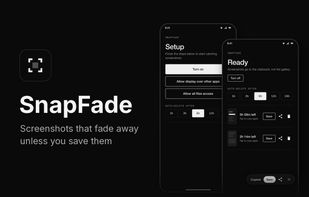
Routes standard Android screenshots to a private cache and clipboard rather than the gallery. Save or share from the popup, set expiry from 1 to 24 hours, and use countdown history to copy again, preserve, edit, share, or delete each temporary capture.


Features
Highlights All activities
SnapFade News & Activities
Recent activities
 Mauricio B. Holguin added SnapFade as alternative to PixelShot, Pixel Screenshots, Secret Screenshots, Shots Studio and 9 more
- Mauricio B. Holguin updated SnapFade
- Paul liked SnapFade
- Paul added SnapFade

Developed by
MasterPusherLicensing
Open Source (MIT) and Free product.Alternatives
13 alternatives listedBadge
Get an embeddable badge for SnapFadeSupported Languages
AlternativeTo Category
Photos & GraphicsGitHub repository
- 36 Stars
- 0 Forks
- 6 Open Issues
- Updated


No comments or reviews, maybe you want to be first?