SmsZip provides an easy-to-use alternative to traditional email encryption: attachments are compressed and encrypted locally, without requiring recipients to use a portal, create an account, or subscribe to any service. Everything runs fully on the user’s device — no cloud, no external servers.
SmsZip is designed for professionals who need a fast, reliable and secure way to handle email attachments in Outlook. The add-in automatically organizes and compresses files, applies strong AES-256 encryption and can deliver the password to the recipient via SMS for maximum security.
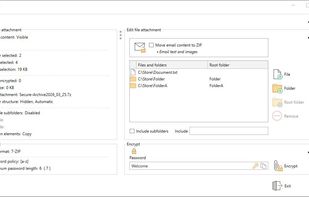
All operations are performed locally on the user’s system — no cloud services, no external servers, no data transmission. The workflow is fully integrated into Outlook: users can pack, encrypt and send attachments directly from the ribbon without leaving their email window.
The interface is intentionally minimalistic, allowing immediate use without onboarding or configuration. SmsZip is ideal for companies, freelancers and organizations that require secure file transfer while maintaining compatibility with standard ZIP tools.
The add-in supports English and German, works on all modern Windows systems and is optimized for environments where reliability, simplicity and security are essential. License keys are bound to the purchaser’s email address and can be deployed individually or in domain-wide setups.







No comments or reviews, maybe you want to be first?