

SmartClipboard
Like
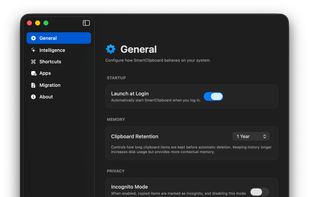
A modern, native macOS menu bar clipboard manager built with SwiftUI. Features intelligent, AI-powered semantic search using Gemini, privacy-first local storage, global hotkey access, and sequential multi-pasting.
Features
Properties
- Privacy focused
- Lightweight
Features
- Dark Mode
- No registration required
- Ad-free
- No Tracking
- SwiftUI App
- Incognito mode
- Support for Keyboard Shortcuts
- Global hotkey
- Support for Hotkeys
- Semantic Search
- Sits in the MenuBar
SmartClipboard News & Activities
Highlights All activities
Recent activities
POX added SmartClipboard as alternative to Ditto, Rememory, PasteBar and Planck- POX added SmartClipboard
SmartClipboard information
No comments or reviews, maybe you want to be first?
What is SmartClipboard?
SmartClipboard is a modern macOS menu bar application built with SwiftUI that enhances your clipboard experience with AI-powered semantic search.
Features:
- Always Accessible: Lives in your macOS menu bar for quick access anytime.
- Dual UI Modes: Triggering the app from the menu bar opens a focused popover, while using the global hotkey reveals a center-screen floating window (Spotlight-style).
- Sequential Pasting: Rapidly paste multiple previous items in order using Option + [1-9]. Perfect for batch-filling forms or re-sequencing snippets.
- Incognito Mode: Start a private session where copied items are temporarily recorded, then permanently purged as soon as the mode is disabled.
- Pins & Favorites: Pin frequently used items to the top or mark them as favorites to protect them from automatic history pruning.
- History Import: Seamlessly migrate your existing clipboard history from Alfred, BetterTouchTool, or Keyboard Maestro.
- Paginated History: Optimized UI that handles thousands of items with zero lag using an intelligent pagination system.
- Quick Actions: Use the Left Arrow key to perform customizable actions (Flash Copy, Google Search, Pin, or Instant Delete) from both list and detail views. If a Left Arrow action is triggered on a valid URL, it automatically opens the URL directly instead of searching.
- Seamless Detail View Navigation: Hitting Right Arrow opens the detail view, and Up/Down arrows let you browse items without leaving the detail view.
- Global Shortcuts: Center-screen floating window access via customizable hotkey and instant indexed pasting using Cmd + [1-9].
- Semantic Search: Ask natural language questions like "Where was that API key?" or "Find that snippet about database migrations" using Gemini AI.
- Smart Insertion: Automatically detects chat apps like Slack or Discord to use Shift+Enter during multi-pastes.
- Privacy First: Automatically filters sensitive data from password managers and respects org.nspasteboard.ConcealedType flags.
- High Performance: Ultra-fast local search and SwiftData persistence layer optimized for zero-latency interactions.


