Smart Form Fill icon

Smart Form Fill

Tired of typing your name, email, phone and address into the same forms over and over? Smart Form Fill uses AI (DeepSeek) to understand what each field in a form means — no templates, no recording, no setup.
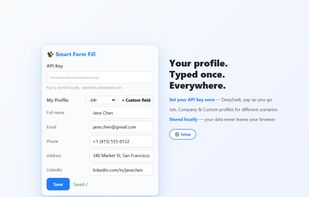
Smart Form Fill screenshot 1

Cost / License

  • Free
  • Proprietary

Platforms

  • Google Chrome
0likes
0comments
0articles

Features

No features, maybe you want to suggest one?

Smart Form Fill News & Activities

Highlights All activities

Recent activities

Smart Form Fill information

  • Developed by

    Swift King
  • Licensing

    Proprietary and Free product.
  • Alternatives

    10 alternatives listed
  • Supported Languages

    • English
Smart Form Fill was added to AlternativeTo by swift king on and this page was last updated .
No comments or reviews, maybe you want to be first?

What is Smart Form Fill?

Tired of typing your name, email, phone and address into the same forms over and over? Smart Form Fill uses AI (DeepSeek) to understand what each field in a form means — no templates, no recording, no setup.

How it works (3 steps):

  1. Add your API key — click the extension icon, paste your DeepSeek API key, save.
  2. Enter your profile once — name, email, phone, address, company, LinkedIn, or add custom fields. Switch between Job / Company / Custom profiles.
  3. Click the ? button on any form page — AI analyzes the form and shows suggested values with a confidence score for each field. Review, tweak, and click "Fill Selected".

Handles all standard controls (text, email, phone, date, dropdowns, radio groups, checkboxes), modern frameworks (React/Vue/Angular), and multi-profile workflows.

Safety first: every suggestion is confirmed by you before filling; fill-only-empty mode never overwrites your input; confirmed mappings are cached per form for instant repeat fills. Your data stays in your browser — no accounts, no tracking, no servers. You bring your own API key.