Stop the scheduling ping-pong. SlotPicker puts your real calendar on a grid, you paint when you're free, and it copies clean text to paste anywhere.
Scheduling shouldn't take five emails.
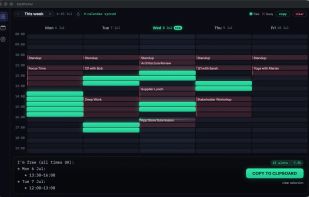
SlotPicker is the fastest way to tell someone when you're free. It reads your real macOS calendars and paints your busy time straight onto a clean weekly grid — then you just drag across the open slots you want to offer and copy them as tidy, formatted text. Paste it into an email, a Slack message, or a text and you're done.
No booking links. No accounts. No back-and-forth.
WHY YOU'LL LIKE IT
• Your calendar, already on the grid — iCloud, Google and any subscribed calendar feed. Busy blocks show up automatically so you never offer a time you can't make.
• Paint your availability — click and drag across the week at half-hour precision. A live "now" line and merged time-runs keep everything readable.
• Copy clean text — one tap turns your selection into neat, day-grouped, timezone-labelled text that reads like you wrote it by hand.
• Templates you control — set your working days, hours, timezone label and a reusable output template with {days} and {timezone} tokens.
• Light and dark — a crafted Night Console dark theme and a bright Day Console light theme, following your system or fixed to your taste.
• Private by design — SlotPicker works entirely on your Mac. There are no servers, no accounts and no tracking. The only thing that ever leaves the app is the text you choose to copy.
Buy it once and it's yours, with free updates.
Requires macOS 14 or later. Universal — Apple silicon and Intel.







 Creavi added SlotPicker as alternative to Creavi Appointment Booking Calendar
 Paul added SlotPicker as alternative to Cal.com, Lunacal, Thunderbird Appointment, Notion Calendar and 47 more


No comments or reviews, maybe you want to be first?