SlangBit icon
SlangBit icon

SlangBit

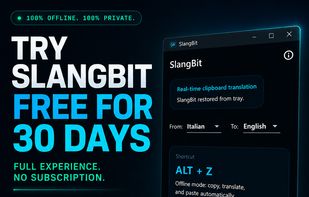
Windows utility performs offline translations using on-device AI, triggered by a global ALT+Z shortcut. Replaces selected text instantly across applications, offers downloadable language packages, and requires no subscription or account.
SlangBit screenshot 1

Cost / License

  • Pay once
  • Open Source

Application type

Platforms

  • Windows  Requires Windows 10 or Windows 11, 64-bit. Distributed exclusively through Microsoft Store. Internet access is only required to download language packages.
1like
0comments
0articles

Features

Properties

  1.  Privacy focused
  2.  AI-Powered

Features

  1.  No Tracking
  2.  Ad-free
  3.  No registration required
  4.  Works Offline
  5.  Translator
  6.  AI-Translation
  7.  Text Translation

SlangBit News & Activities

Highlights All activities

Recent activities

SlangBit information

  • Developed by

    IT flagMemmola Labs
  • Licensing

    Open Source and Commercial product.
  • Pricing

    One time purchase (perpetual license) that costs $17.
  • Alternatives

    5 alternatives listed
  • Supported Languages

    • English
    • French
    • German
    • Italian
    • Chinese
    • Spanish

AlternativeTo Category

Education & Reference

GitHub repository

  •  0 Stars
  •  0 Forks
  •  0 Open Issues
  •   Updated  
View on GitHub
SlangBit was added to AlternativeTo by Alessandro Memmola on and this page was last updated .
No comments or reviews, maybe you want to be first?

What is SlangBit?

SlangBit is an offline translation utility for Windows that lets users translate selected or copied text from virtually any application.

After selecting and copying text, the user presses the global ALT+Z keyboard shortcut. SlangBit translates the text locally on the computer and automatically pastes the translated result back into the active application.

Translations are processed on-device using local AI models, so selected text is not sent to external translation services. Additional language packages can be downloaded and managed from within the application.

Key features include:

• Offline, on-device translation • Global ALT+Z keyboard shortcut • Works across Windows applications through the clipboard • Automatic replacement of selected text • Downloadable language packages • Windows system tray integration • No account required • No subscription • 30-day free trial • One-time purchase through Microsoft Store

SlangBit is designed for users who frequently translate emails, documents, customer messages, web content and other potentially sensitive text without interrupting their workflow.

SlangBit Videos

Official Links

