


SingleFileZ
Web Extension for Firefox/MS Edge and CLI tool to save a faithful copy of an entire web page in a self-extracting HTML/ZIP polyglot file.
Cost / License
- Free
- Open Source (AGPL-3.0)
 EU
EUPlatforms
- Microsoft Edge
- Google Chrome
- Firefox


Features
- Supports Zip files
 Support for Docker
Tags
- selenium
- puppeteer
- self-extracting
- maff
- web-extensions
- Firefox
- html
- singlefile
SingleFileZ News & Activities
Recent activities
SingleFileZ information
Developed by
 gildas-lormeau
 Licensing
Open Source (AGPL-3.0) and Free product.Written in
Alternatives
10 alternatives listedSupported Languages
- English

AlternativeTo Categories
File Management, Web BrowsersGitHub repository
- 1,922 Stars
- 141 Forks
- 31 Open Issues
- Updated



What is SingleFileZ?
SingleFileZ is an add-on that helps you to save a complete page (with CSS, images, fonts, frames, etc.) as a single HTML file. This HTML file is also a valid ZIP file containing all the page resources.
Getting started
Wait until the page is fully loaded. Click on the SingleFileZ button in the extension toolbar to process and save the page. You can click again on the button to cancel the action when processing a page.
Additional notes
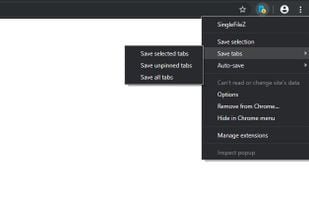
Open the context menu by right-clicking the SingleFileZ button in the extension toolbar or on the webpage. It allows you to save: the current tab, the selected content, the selected frame, the selected link. You can also process multiple tabs in one click and save: the selected tabs, the unpinned tabs, all the tabs. The context menu also allows you to activate the auto-save (after pages are being loaded) of: the current tab, the unpinned tabs, all the tabs. Right-click on the SingleFileZ button and select "Manage extension" to open the options page. Enable the option "Destination > save to Google Drive" to upload pages to Google Drive. Enable the option "Destination > save to GitHub" to upload pages to GitHub. You can use the customizable shortkey Ctrl+Shift+Y to save the current tab or selected tabs. And more!