


ShutUp10++
171 likes
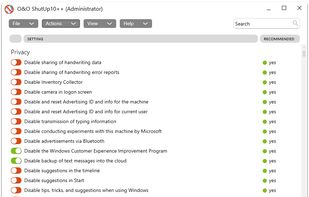
O&O ShutUp10++ means you have full control over which comfort functions under Windows 10 and Windows 11 you wish to use, and you decide when the passing on of your data goes too far. Using a very simple interface, you decide how Windows 10 and Windows 11 should respect your...

Cost / License
- Freemium (Pay once)
- Proprietary
Application typeApplication types
 EU
EUPlatforms
- Windows


Features
Highlights All activities
ShutUp10++ News & Activities
Recent News
No news, maybe you know any news worth sharing?
Share a News Tip
Recent activities
- humble-advisor liked ShutUp10++
- fartmaster liked ShutUp10++
 ProtagonistLabs added ShutUp10++ as alternative to Protagonist Sysoptimizer
- Shadow5964 | シャドウ liked ShutUp10++
- castipo liked ShutUp10++
- Maria-Oliver liked ShutUp10++
- brokesimp69 liked ShutUp10++
- konsupreme liked ShutUp10++
- mrcyodev liked ShutUp10++


The Complete Suite of Programs Needed After New Windows Installation [V2.0: Advanced]
After a fresh Windows installation, new users might get frustrated by the weakness of the default Microsoft apps. So, in this list I'm going to cover applications that will enhance the user experience for everyday tasks. And for that, I only picked programs that meet these criteria:
• Should be free (not commercial), safe and preferably open-source.
• Should be an offline native desktop app/client.
• Does not require advanced technical knowledge.
Thus, the list is tailored to non tech-savvy home users, however, a section for people who are into computer programming and IT will be also added, which includes basic and commonly-used development and coding tools.


Best free Win10/11 sys tools - Updated June 15, 2024
Use these free utilities to backup, update, clean, and optimize Windows 10/11.


My Setup - All Apps and Software
Master List of all Apps and Software I use for both work and personal life.
Developed by
 O&O
O&O Licensing
Proprietary and Freemium product.Pricing
One time purchase (perpetual license) ranging between $20 and $30 + free version with limited functionality.Rating
Average rating of 4.4Alternatives
49 alternatives listedBadge
Get an embeddable badge for ShutUp10++Supported Languages


Comments and Reviews
Seems to work but it misses the mark. Would put my mind at ease if it were open source. I don't wanna trade Win10 malware for different malware.
Definitely doesn't block telemetry (anymore?), which means it also possibly re-enables telemetry disabled by other anti-spy programs. Should come as no surprise as O&O has become a Microsoft Gold Partner.
On to W10Privacy...
do you have some data that i can research about this?
It basically corrupts your Windows 10 install because most of your settings in the default Windows settings app become locked (it'll say "some of these settings are hidden or managed by your organization") after just running it. There's no "Click Apply to apply these settings", which is odd for a program that has destructive behavior. As soon as you touch one toggle, it applies all of the preselected options without a real warning (which include the ones that block your ability to change Windows settings like normal). It also offers to make a restore point for you, but it didn't actually make one for me.
It is a controversial program, definitely not created for privacy protection. Like, it recommends disabling pretty neutral features, i.e. clipboard history, but something hostile like sending URLs opening with apps to Microsoft is marked as "not recommended to disable". WTF?
That particular setting is about sending Store App urls to Microsoft Defender's SmartScreen so it's a choice of security vs. privacy. The user gets to choose which is more important to them.
Must have for any windows user.
Its a good app and helps protect my data. If i may due recommend giving some donation to developers.
Yes, some optimizers do something similar, but this puts privacy settings nice and neatly. And everything is easily reset.