


Shotcut
Free and open-source, Shotcut is a cross-platform video editor supporting myriad formats with native editing, multi-format timelines, and precise seeking. It offers versatile resolution supports, capturing options up to 4k, and extensive platform integration through various capture and monitoring services.
Cost / License
- Free
- Open Source (GPL-3.0)
Application type
Platforms
- Mac
- Windows
- Linux
- AppImageHub
- Snapcraft
- Flathub
- PortableApps.com

Features
Properties
- Lightweight
- Privacy focused
- Support for Themes
Features
- No Watermark
- Video filters
- Video Converter
- Keyframe Animation
- Visual timeline
- Trim video
- Low CPU usage
- CPU&GPU Rendering
- Dark Mode
- Ad-free
- Works Offline
- No registration required
- Timeline
- Non linear editor
- Portable
- Chroma Key / Green Screen
- Support for 4K
- Drag and Drop
- pan–tilt–zoom camera
- Live Preview
- WYSIWYG Support
- Hardware Accelerated
- Transitions Effects
- No Tracking
- Track everything
- Embed subtitles into video
- Image Masking
- Multitrack editing
- Support for subtitles
- WEBM Support
- FFMPEG support
- Subtitles and captions
- Support for HTML5
- Normalize Volume
- Do not disturb mode
Shotcut News & Activities
Recent News
- Fla published news article about Shotcut
 Shotcut 26.2 update: new text options, subtitle search & crash fixes
Shotcut version 26.2 adds underline and strikethrough options for text filters and introduces a sea...
- POX published news article about Shotcut
 Open source video editor Shotcut 26.1 finally introduces hardware video decoding
Shotcut 26.1 has been released as the latest version of this open source multi-track video editor. ...
- POX published news article about Shotcut
 Shotcut 25.12 adds 10-bit video CPU pipeline, linear color processing, and UI upgrades
Shotcut 25.12 is now available as the latest version of this free, open source, and cross-platform ...


Recent activities
- rorro-roads liked Shotcut
- choomaque reviewed Shotcut
Much more intuitive than the KDEnlive in details. Crappy performance.
 Alaik added Shotcut as alternative to Cardboard Video Editor
- ravenduke liked Shotcut





Featured in Lists

This is going to be a list of the free tools/software that can be used mostly in any field. it's based on websites …

There is no doubt that Adobe Suite is great, even in some case it's probably the best. But you can be mad …

Here's a list of free and/or open source creative software that I found
What is Shotcut?
Shotcut is a free, open source, cross-platform, non-linear video editor.
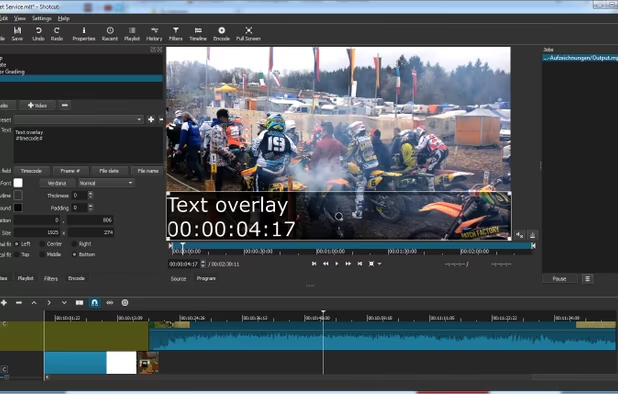
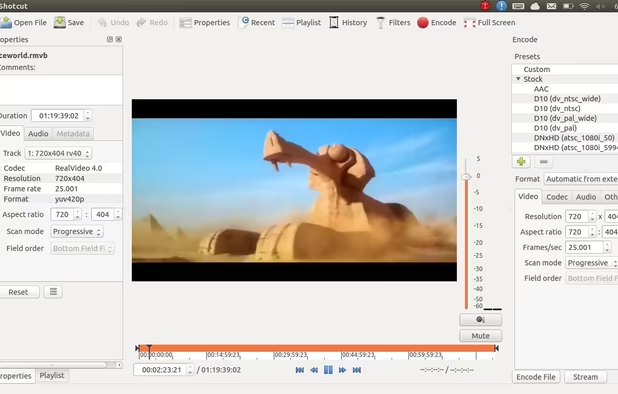
Supports hundreds of audio and video formats and codecs thanks to FFmpeg. No import required which means native editing, plus multi-format timelines, resolutions and frame-rates within a project. Frame accurate seeking supported for many video formats.
Blackmagic Design SDI and HDMI for input and preview monitoring. Screen, webcam and audio capture. Network stream playback. Supports resolutions up to 4k and capture from SDI, HDMI, webcam, JACK & Pulse audio, IP stream, X11 screen and Windows DirectShow devices.
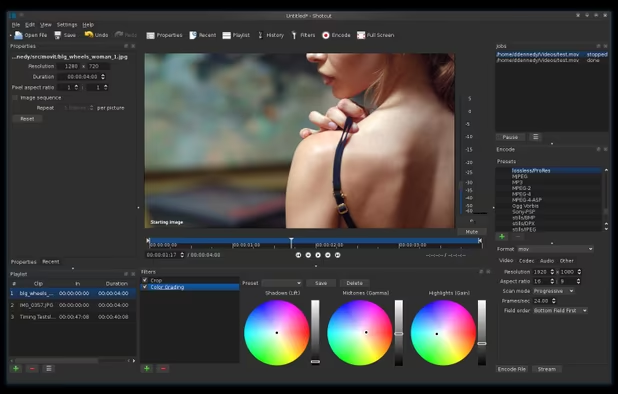
Multiple dockable and undockable panels, including detailed media properties, recent files with search, playlist with thumbnail view, filter panel, history view, encoding panel, jobs queue, and melted server and playlist. Also supports drag-n-drop of assets from file manager.
Shotcut Videos

Shotcut information
Developed by
 Meltytech, LLC.
 Licensing
Open Source (GPL-3.0) and Free product.Written in
Rating
Average rating of 3.9Alternatives
136 alternatives listedNews
15 news article related to ShotcutSupported Languages
- English

AlternativeTo Categories
Video & Movies, Photos & Graphics, System & Hardware, Audio & MusicGitHub repository
- 13,709 Stars
- 1,327 Forks
- 37 Open Issues
- Updated


Comments and Reviews
I have been looking for good, free, non-linear video editing tools for many years. This has always led me to the same handful of programs which do some nice things, and are good enough to improve on using iMovie or Windows Movie Maker. But they also all had some very strict limitations. Some don't deal well with different audio and video formats, others are very limited in their timeline editing, and still others have very limited encoding options.
For me, Shotcut appeared seemingly out of nowhere, and I was completely amazed how feature-complete and professional it is. So far I haven't found anything where the program would restrict my options, as most others do. It reads an impressive number of input formats. It allows me to customise my project settings with regards to picture format, so there won't be any surprises with unwanted resizing or "re-timing" of my input video. Likewise, it gives me complete control over the encoder, providing many presets, but allowing customisation down to the command line level – and handling encoding in a professional-style asynchronous queue.
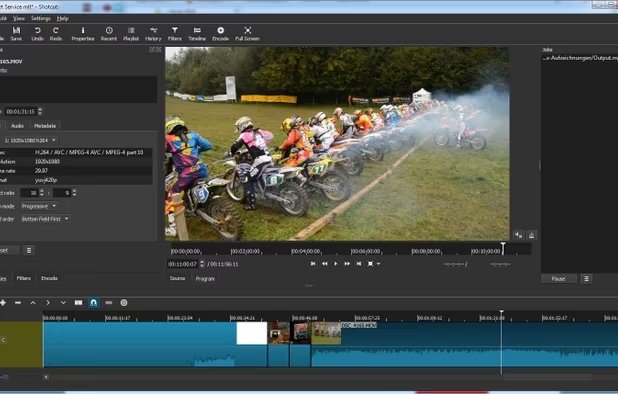
The timeline editor is great, you'll be adding unlimited tracks and dragging in and out audio and video, cutting and trimming and overlaying in a breeze. Plus, it looks nice. The software makes it very easy to precisely trim input material, and comes with a selection of audio and video filters to boot. What it doesn't give you, unlike some other tools, is fancy amateur video transitions between clips. You can probably put together a few simple things using video filters and multiple tracks, but none of this drag & drop transition library business (your videos will probably look better without them anyway).
I'm glad to have finally found something like Shotcut. That it's open-source and seems to be updated very frequently is the icing on the cake. If you're looking for a "lightweight Premiere" non-linear editing suite (in contrast to linear editors such as Avidemux or VirtualDub), be sure to check this one out.
Marginally better than its "cousin" OpenShot (which is based on the same framework). Shotcut seems to be a bit more stable, but suffers from the same void of features, and a clumsy user interface. For example, you can not select several clips at once to apply an action to them (e.g. detach audio) - you have to do it for each clip by itself. Most annoyingly though, both programs seem to suffer from a very similar bug, where repeated use of "undo" and "redo" can sometimes scramble your project beyond repair, loosing tracks, clips, or leaving them in the wrong order. This is not acceptable. If I lose hours of work due to a bug, I can not consider a software as usable.
Much more intuitive than the KDEnlive in details. Crappy performance.
The best that free and open source has to offer as far as video editing is concerned.
Does all the simpler video editing tasks right. It also keeps getting updated with more features, and it's open source and cross-platform.
Pro: the app is free, open source, has support for hardware acceleration of encoding, due to which video export in some cases is several times faster than similar apps without hardware support. Quite a convenient tool for cropping (trimming a frame). Cons: I was unable to crop the video (remove extra fields from the frame using the Crop Rectangle tool). After setting up Crop with preview and applying it to the current video, every time the export ends up with a video without any crop applied. Something doesn't work or is organized in a counterintuitive way.
Best no-nonsense video editor on Linux. I've tried Kdenlive, OpenShot, and Davinci Resolve to no success. All of them had issues. Shotcut ticks all my boxes of being fast, easy, and regularly updated. Notably, the most recent update (24.02 BETA) adds AMD AV1 hardware encoding. No more converting with Handbrake for me. Also, it's great how it doesn't generate a massive video cache for no reason. My only complaint is the instability, and lack of features, like good filters/transitions. I do miss the exceptional Noise Reduction of Premiere Pro, and the color grading of Davinci Resolve, but for my simple needs Shotcut is more than adequate. Shotcut is rock solid for the most part, but will freeze/crash on simple tasks, like editing keyframes or pressing ctrl-z for undo.