Shelf Collaborative Web Clipper icon

Shelf Collaborative Web Clipper

 3 likes

This collaborative bookmarking tool is the best way to capture and share web content within your team or across your organization.
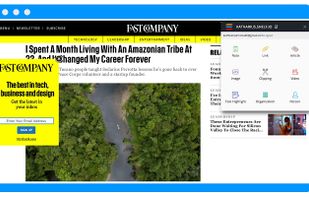
Shelf Collaborative Web Clipper screenshot 1

Cost / License

  • Free
  • Proprietary

Since

  • Since 2016

Alerts

  • Discontinued

Platforms

  • Windows  As browser extension.
  • Mac  As browser extension.
  • Linux  As browser extension.
  • Google Chrome
  • Firefox
Discontinued

Link for the web clipper has been taken down. Remainder of Shelf site is marketing for their B2B product, with no mention of web clipper

3likes
0articles
Save

Features

Features

Highlights All activities

Shelf Collaborative Web Clipper News & Activities

Recent activities

No activities found.

Shelf Collaborative Web Clipper information

Shelf Collaborative Web Clipper was added to AlternativeTo by RemovedUser on and this page was last updated . Shelf Collaborative Web Clipper is sometimes referred to as Shelf, Shelf Web Clipper. 

No comments or reviews, maybe you want to be first?

Featured in Lists

Curate

A list with 292 apps by christineconnor without a description.
By christineconnor292 appsUpdated

A. LINKS

A list with 190 apps by shaesolomon without a description.
By Shae Solomon190 appsUpdated

*Bookmarks

A list with 150 apps by christineconnor without a description.
By christineconnor150 appsUpdated

What is Shelf Collaborative Web Clipper?

This collaborative bookmarking tool is the best way to capture and share web content within your team or across your organization. Evernote and Pocket made it easy for individuals to curate collections of web content. Shelf takes this same power to the next level for group collaboration. Shelf improves the way that content is organized and found so important links don’t get lost and buried. Shelf enables your group to:

  • Grab anything in a flash - YouTube videos, blog posts, screen grabs, LinkedIn profiles, infographics, and more.
  • Organize your web links alongside documents in folders, subfolders, personal libraries, group libraries, and an organization library.
  • Find content by keyword search or filter by: date, user, folder, tag, source, content type, and more. Your can even use keyword search and filters together for more advanced searches.
  • Users can even import or sync content from Google Drive, Dropbox, or Microsoft OneDrive.

Eliminate the hassle of searching for the same links over and over again. Save everyone time and frustration by using a collaborative web clipping tool specifically designed for teams and large groups of people.

Shelf Collaborative Web Clipper Videos