
ShapeForge icon
ShapeForge icon

ShapeForge

 Like

Local-first parametric CAD for Windows with an AI design assistant. Free basic tier, $10/month full. Your files stay on your machine.
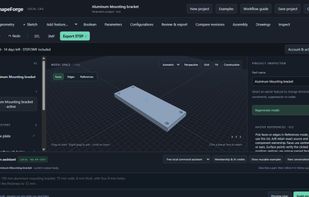
Main workspace

Cost / License

  • Freemium (Subscription)
  • Proprietary

Application type

Since

  • New

Platforms

  • Windows
0likes
0articles
Save

Features

Features

Highlights All activities

ShapeForge News & Activities

Recent activities

ShapeForge information

  • Developed by

    ShapeForge
  • Licensing

    Proprietary and Freemium product.
  • Pricing

    Subscription that costs $10 per month + free version with limited functionality.
  • Alternatives

    3 alternatives listed
  • Badge

    Get an embeddable badge for ShapeForge
  • Supported Languages

    • English

AlternativeTo Categories

Photos & Graphics, System & Hardware
ShapeForge was added to AlternativeTo by Mitch Dee on and this page was last updated .

No comments or reviews, maybe you want to be first?

What is ShapeForge?

Fusion 360 taught a generation of makers parametric modeling — then the prices climbed, the free tier shrank, and your projects moved into Autodesk's cloud whether you liked it or not. ShapeForge is the alternative built the other way:

  • Local-first. Projects are .shapeforge files on your computer. The local CAD service runs on your machine; nothing is auto-uploaded.
  • Real parametrics. Open CASCADE kernel, sketches, named parameters, editable feature history, STEP/3MF/DXF/drawing exports.
  • An assistant that asks first. A free built-in command assistant runs locally; the optional hosted AI shows a plan and applies nothing without your approval.
  • Pricing you can say in one breath. Basic CAD + STL free forever. Full trial 14 days, no card. Membership $10/month. Honest note: ShapeForge is a focused tool for mechanical parts, in preview. If you live in surfacing or simulation suites, we're not your replacement yet. If you model brackets, enclosures, mounts and parts — and want them back on your own disk — try the free tier. Install note: Windows may show a SmartScreen prompt because the installer is unsigned — click 'More info', then 'Run anyway'. Verify your download: SHA-256 checksum is published next to the download on the GitHub release page.