
ClipSalvage icon
ClipSalvage icon

ClipSalvage

ClipSalvage is a specialized data recovery application built specifically for Tesla owners who have lost Sentry Mode, Dashcam, or saved video clips from their USB drives. Whether the drive was accidentally formatted, the file system became corrupted, or clips were deleted to...
ClipSalvage screenshot 1

Cost / License

  • Freemium (Pay once)
  • Proprietary

Platforms

  • Mac
  • Windows
0likes
0comments
0articles

Features

  1.  Delete Temporary Files
  2.  Recover Corrupted Files
  3.  Ad-free
  4.  Photo Recovery

ClipSalvage News & Activities

Highlights All activities

Recent activities

ClipSalvage information

  • Developed by

    Qloud LTD
  • Licensing

    Proprietary and Freemium product.
  • Pricing

    One time purchase (perpetual license) ranging between $10 and $29 + free version with limited functionality.
  • Alternatives

    25 alternatives listed
  • Badge

    Get an embeddable badge for ClipSalvage
  • Supported Languages

    • English
ClipSalvage was added to AlternativeTo by Spyros Ioakeim on and this page was last updated .
No comments or reviews, maybe you want to be first?

What is ClipSalvage?

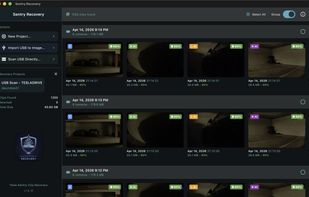
ClipSalvage is a specialized data recovery application built specifically for Tesla owners who have lost Sentry Mode, Dashcam, or saved video clips from their USB drives. Whether the drive was accidentally formatted, the file system became corrupted, or clips were deleted to make space, it scans the raw sectors of the USB drive (or a disk image copy) for MP4 video signatures — bypassing the file system entirely, so it recovers clips even when the file system is damaged or erased. Cluster-aligned carving makes this roughly 131,000× faster than byte-by-byte scanning: a 128 GB drive typically completes in 2–5 minutes.

Since v2.20.0 it also recovers and decrypts Tesla's encrypted clips (vehicle software 2026.20+, which encrypts every new clip as a per-file container with keys sealed to the vehicle). A one-time in-app Tesla sign-in fetches your keys; everything afterwards — re-scans, decryption, export — runs fully offline. Partially-overwritten clips are automatically repaired into playable video.

It is built around Tesla's own format: it identifies every camera position across both hardware generations (AI4/HW4 cars record 6 — front, back, left repeater, right repeater, left pillar, right pillar; AI3/HW3 cars record 4, with no pillar cameras), using an on-device vision model when filenames have been overwritten. It recovers original filenames from deleted directory entries, groups clips by Sentry event, generates preview thumbnails, scores each clip 0–100 for recovery confidence across 7 factors, and supports exFAT and FAT32. Everything runs locally — no video data is uploaded.

Trial mode scans and previews every recoverable clip for free, encrypted clips included: the first 3 recoveries and up to 30 encrypted-clip decryptions cost nothing, with no time limit. Two one-time purchases, no subscription — Decrypt ($9.99) for batch decrypting and exporting encrypted clips, Pro ($29) for unlimited recovery plus decryption. Available for macOS (Apple Silicon) and Windows (x64 and ARM64).

ClipSalvage Videos