Screentide icon
Screentide icon

Screentide

Screentide is a highly customizable, responsive, and minimalist screentime tracking widget for the KDE Plasma 6 Desktop Environment, powered by the local, open-source ActivityWatch engine.
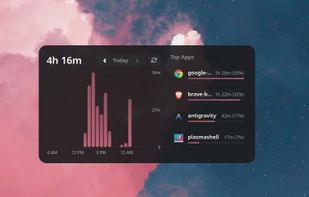
Screentide screenshot 1

Cost / License

  • Free
  • Open Source (MIT)

Platforms

  • Linux
  • KDE Plasma
0likes
0comments
0articles

Features

Properties

  1.  Support for Themes
  2.  Privacy focused
  3.  Customizable

Features

  1.  Dark Mode
  2.  No Tracking
  3.  No registration required
  4.  Ad-free
  5.  Screen time
  6.  KDE Widget
  7. KDE Plasma icon  KDE Plasma integration

Screentide News & Activities

Highlights All activities

Recent activities

Screentide information

  • Developed by

    Pratyaksh Agarwal
  • Licensing

    Open Source (MIT) and Free product.
  • Alternatives

    1 alternatives listed
  • Supported Languages

    • English

GitHub repository

  •  14 Stars
  •  1 Forks
  •  1 Open Issues
  •   Updated  
View on GitHub

Popular alternatives

View all
Screentide was added to AlternativeTo by Paul on and this page was last updated .
No comments or reviews, maybe you want to be first?

What is Screentide?

A highly customizable, responsive, and minimalist screentime tracking widget for the KDE Plasma 6 Desktop Environment, powered by the local, open-source ActivityWatch engine.

Screentide lets you visualize your daily computer usage total, hourly activity charts, and top applications at a glance, directly from your desktop or panel.

Key features:

Responsive Layout Reflow:

  • Dual Mode Layout: Smoothly transitions between a vertical Portrait layout and a side-by-side Landscape layout on resize.
  • Adaptive App Grid: Top applications automatically reflow between 1-column and 2-column layouts depending on widget width to prevent layout squishing.
  • Fluid Typography: Header text and label sizes automatically scale down on compact widget sizes to avoid text clipping.

System Theme Matching & Color Engine:

  • System Accent Colors: Automatically match your system theme accent colors (such as wallpaper-based accent schemes) with programmatic gradients, or bypass gradients entirely with Solid Color mode.
  • Manual Palette Picker: Customize colors (Background, Border, Bar Gradients, Hover States) visually using the native KDE system color dialog or hex input fields.

Dynamic Hour Grouping:

  • Group hourly usage bars into 1-hour, 2-hour, 3-hour, 4-hour, or 6-hour intervals. It is perfect for shrinking widget sizes down to fewer bars without losing details.
  • Bar widths scale dynamically to zero-overlap, ensuring visual clarity even on narrow screens.

Application Blacklisting:

  • A comma-separated exclusion filter to hide background processes, system lock screens, or desktop launchers (e.g. krunner, lockscreen, plasmashell) from your stats.

Robust Offline Recovery:

  • If aw-server is stopped or unreachable, Screentide displays a clean warning screen with an instant Retry button so you can re-connect as soon as the service is back online.

Official Links