
Screen2ipcam  icon
Screen2ipcam  icon

Screen2ipcam

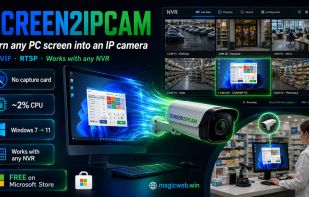
Screen2ipcam is a software-only Windows tool that publishes a PC screen as a standard IP camera. Instead of pointing a physical camera at a monitor or buying an HDMI capture card and hardware encoder, you install Screen2ipcam and the machine appears on your network as an ONVIF...
Screen2ipcam  screenshot 1

Cost / License

  • Freemium (Pay once)
  • Proprietary

Platforms

  • Windows
0likes
0comments
0articles

Features

Properties

  1.  Lightweight

Features

  1.  Real time collaboration
  2.  Ad-free
  3.  No Coding Required
  4.  End-to-End Encryption
  5.  Live Preview
  6.  IP camera
  7.  Point of sale
  8.  Video-surveillance

Screen2ipcam News & Activities

Highlights All activities

Recent activities

Screen2ipcam information

  • Developed by

    EG flagMagicWeb
  • Licensing

    Proprietary and Freemium product.
  • Pricing

    One time purchase (perpetual license) that costs up to $20 + free version with limited functionality.
  • Alternatives

    1 alternatives listed
  • Supported Languages

    • English
    • Arabic

AlternativeTo Categories

Business & CommerceSecurity & Privacy

Popular alternatives

View all
Screen2ipcam was added to AlternativeTo by MagicWeb on and this page was last updated .
No comments or reviews, maybe you want to be first?

What is Screen2ipcam ?

Screen2ipcam is a software-only Windows tool that publishes a PC screen as a standard IP camera. Instead of pointing a physical camera at a monitor or buying an HDMI capture card and hardware encoder, you install Screen2ipcam and the machine appears on your network as an ONVIF Profile S camera with an H.264 RTSP stream — so any NVR, DVR or VMS can auto-discover and record it like a real camera.

It publishes a main and a sub stream plus a JPEG snapshot, uses about 2% CPU while streaming, needs no .NET or extra libraries, and runs on Windows 7 SP1 through Windows 11 (32 and 64-bit, including IoT / Embedded / POSReady). Configure it from a native panel or a bilingual (English / Arabic) web panel, and run it as a Windows service or a tray app.

Typical uses: recording point-of-sale / cashier screens next to the camera feed, monitoring lab, classroom and exam workstations, and keeping SCADA/HMI and control-room screens on the recorder. Tested with Dahua, Hikvision, Blue Iris and Agent DVR; compatible with any ONVIF Profile S / RTSP system.

A free edition is available on the Microsoft Store; the full version is a one-time $20 lifetime license (14-day trial, no subscription).

Official Links