
Screen Recorder by WebcamEffects icon

Screen Recorder by WebcamEffects

Free Screen recorder for Windows PC, Mac, Chromebook and Linux.
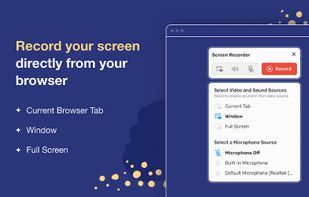
user interface

Cost / License

  • Free
  • Proprietary

Platforms

  • Google Chrome
1like
0comments
0articles

Features

Properties

  1.  Lightweight
  2.  Privacy focused

Features

  1.  Ad-free
  2.  No Tracking
  3.  Screen Recording

Screen Recorder by WebcamEffects News & Activities

Highlights All activities

Recent activities

Screen Recorder by WebcamEffects information

  • Developed by

    US flagDamico Inc
  • Licensing

    Proprietary and Free product.
  • Alternatives

    5 alternatives listed
  • Supported Languages

    • English
Screen Recorder by WebcamEffects was added to AlternativeTo by Dmitry Myakishev on and this page was last updated .
No comments or reviews, maybe you want to be first?

What is Screen Recorder by WebcamEffects?

Screen recorder - simple, tiny, user-friendly and full-featured!

🔥This Chrome extenesion captures screen, webcamera, microphone and system sound, and autosaves recordings to your computer in MP4 format.

Key Features:

Capture screen in three modes: whole desktop, separate window or chrome tab Record screen with system sound, microphone, both of them or no audio at all.

The Screen recorder extension is free, without watermark, limits and sign ups!

How to make a screen recording?

  1. Install the extension by clicking the "Add to Chrome" button
  2. Open a new browser page or reload the current page
  3. Click the extension icon
  4. Grant access to your microphone if you want to record your voice
  5. Select video and audio sources in the pop-up dialog
  6. Record your video
  7. Once you click Stop, the recording will be automatically downloaded to your Downloads directory

Top Use cases

  • Record simple tutorial videos: how to use any website or application.
  • Save time when discussing a problem or bug: create steps to reproduce a video that helps the developer understand the context and find the problem.
  • Capture system sound: recording system sound works for Chrome tab option, so you can share your game play with all the details.
  • Eliminate work meetings in favor of more effective, asynchronous communication.
