Rotiva icon
Rotiva icon

Rotiva

 Like

Rotiva is a free file converter for Windows 10 and 11 that works without opening an app window. It runs in the system tray: while a file is being dragged, pressing Shift shows a radial menu at the cursor with the formats that fit that file.
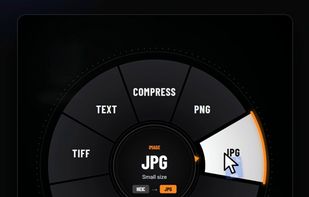
Format wheel that appears at the cursor when Shift is pressed while dragging a file

Cost / License

  • Free
  • Proprietary

Application type

Since

  • New

Platforms

  • Windows
0likes
0articles
Save

Features

Properties

Features

Highlights All activities

Rotiva News & Activities

Recent activities

Rotiva information

Rotiva was added to AlternativeTo by Denish-Chairany on and this page was last updated .

No comments or reviews, maybe you want to be first?

What is Rotiva?

Rotiva is a free file converter for Windows 10 and 11 that works without opening an app window. It runs in the system tray: while a file is being dragged, pressing Shift shows a radial menu at the cursor with the formats that fit that file. Releasing over a format saves the converted copy next to the original. The same actions are also available from the Explorer right-click menu.

It converts images (PNG, JPG, WEBP, AVIF, HEIC, TIFF, ICO), video (MP4, MKV, MOV, AVI, WEBM, GIF), audio (MP3, WAV, FLAC, OGG, OPUS, M4A), documents (DOCX, PDF, ODT, TXT, MD) and spreadsheets (XLSX, CSV, ODS). It can also compress images, video and PDFs, merge several files into one PDF, split PDFs, extract text from images with Windows OCR, and extract RAR, 7Z, ZIP and TAR.GZ archives.

All processing is local. FFmpeg, ImageMagick, Ghostscript, LibreOffice, Pandoc and 7-Zip are bundled, so no files are uploaded. No ads, no usage limits and no admin rights are needed.