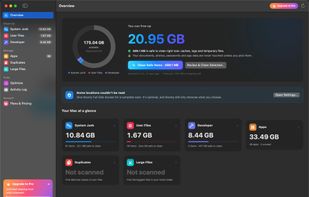
Roomy finds the gigabytes your Mac quietly fills up with, such as app caches, logs, temporary files, Xcode build data and package-manager caches, and clears them safely. Before anything is removed, you see exactly what goes and what stays.
SAFE BY DESIGN
• Only rebuildable data is ever selected for you: caches, logs, temporary files, build data and package caches. Apps and macOS recreate them when needed.
• Every item is rated Safe, Review or Caution, with a plain-English note on what is removed, what stays and where it lives.
• App data is opt-in. Browsers only lose their web cache; bookmarks, passwords, history and logins stay.
• Anything that isn't rebuildable moves to the Trash, so you can put it back.
• Every path is checked again right before removal. macOS system folders, iCloud Drive, Keychains, Mail and Messages are never touched.
• Exclude any file or folder with "Never Clean This". The Activity Log records every clean.
WHAT ROOMY CLEANS
• System Junk: app and browser caches, logs, crash reports and old temporary files.
• User Files: old downloads, leftover installers, local iPhone and iPad backups, Mail attachment copies and the Trash. These are never selected for you.
• Developer: Xcode DerivedData, device support files, simulator caches and archives, plus npm, Yarn, pnpm, Bun, Homebrew, pip, CocoaPods, Swift Package Manager, Gradle, Maven, Cargo, Go, VS Code and JetBrains caches. Your projects are never touched.
• Apps: uninstall apps together with the caches, logs and helpers they leave behind, and see which apps you haven't opened in months. Documents and settings stay unless you choose to remove them.
• Duplicates: find true duplicates by comparing file contents, not names. The oldest copy is kept.
• Large Files: spot the biggest forgotten files in your home folder.
• Optimize: free up memory, flush DNS, rebuild Launch Services, thin local Time Machine snapshots, delete unavailable simulators, reindex Spotlight, and review launch agents with broken ones flagged.
Requires macOS 14 Sonoma or later, on Apple silicon or Intel.







 techly added Roomy for Mac as alternative to CleanMyMac, AppCleaner, Pearcleaner, DaisyDisk and 3 more


 TSOFT LLC


No comments or reviews, maybe you want to be first?