





Research Web Highlighter
Like
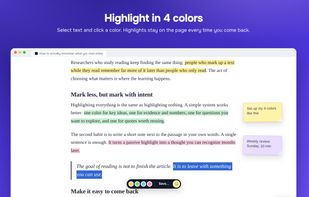
Research Web Highlighter is a Chrome extension for people who read a lot online. Select text on any webpage, pick one of four colors, and the highlight stays there when you come back.

Cost / License
- Freemium (Subscription)
- Proprietary
Platforms
- Google Chrome


Features
Highlights All activities
Research Web Highlighter News & Activities
Recent activities
- Flowly-App updated Research Web Highlighter
- Flowly-App updated Research Web Highlighter
 Flowly-App added Research Web Highlighter as alternative to Diigo
- Flowly-App added Research Web Highlighter
- Flowly-App updated Research Web Highlighter
 Flowly-App added Research Web Highlighter as alternative to Glasp, Liner, Web Highlights, Weava and 2 more


Developed by
Research Web HighlighterLicensing
Proprietary and Freemium product.Pricing
Subscription ranging between $4 and $6 per month + free version with limited functionality.Alternatives
7 alternatives listedBadge
Get an embeddable badge for Research Web HighlighterSupported Languages

No comments or reviews, maybe you want to be first?