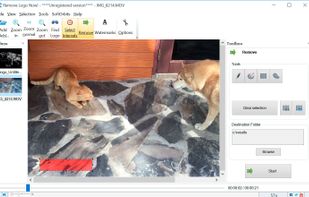
Remove Logo Now (SoftOrbits) is an offline Windows video watermark remover that lets you remove watermark from video, remove logo from video and delete overlay from video without uploading a single frame. This dedicated video logo remover erases static and moving logos, channel bugs, sponsor marks, timecodes, hard subtitles and semi-transparent watermarks - including TikTok and streaming overlays - straight on your PC. Use it to erase watermark marks from stock footage or to remove subtitle from video files in a few clicks. Everything is processed locally by a fast CPU engine, so even large multi-hour recordings stay private and no cloud service ever sees your content.
🔰 How to use
- Add files or drag & drop your videos (MP4, AVI, MOV, MKV, WMV).
- Run auto-detection to find the watermark area, or outline it manually with box and brush tools.
- Set time intervals if the overlay appears only in part of the timeline.
- Adjust output frame rate and resolution (up to 4K), then click Start.
- Check the output folder - or queue a whole folder for batch video processing.
👍 Why choose it
- Purpose-built video watermark remover, not a generic photo editor.
- Automatic watermark detection scans every frame, including semi-transparent logos and subtitles.
- Time-interval marking removes overlays that appear only briefly.
- Batch video processing clears whole folders of clips automatically.
- CPU-based FFmpeg engine - runs fast on any PC, no GPU required.
- Supports MP4, AVI, MOV, MKV, WMV with adjustable frame rate and up to 4K output.
- Command-line mode for scripting and repeat jobs.
- 100% offline - videos never leave your PC; no length or file-size limits.
- One-time purchase - use it forever, no subscription, unlimited videos.
- Manual box and brush selection for precise, frame-accurate control.
Great for
- Cleaning watermarks off purchased stock footage.
- Prepping clips from TV, TikTok or other sources with unwanted brand logos.
- Removing channel bugs, sponsor logos and timecodes from client videos.
- Stripping hard subtitles and captions to remove subtitle from video.
- Batch processing large libraries of recordings in one queue.
Does it use AI? No - a lightweight local algorithm, no costly GPU required.
Is it private? Yes - the entire job runs on your PC, nothing is uploaded.
Max video length? No limit - it processes multi-gigabyte, multi-hour files.
Which formats work? MP4, AVI, MOV, MKV and WMV, with output up to 4K.
Can it remove moving logos? Yes - detection tracks logos across every frame.
Is there a trial? Yes - a free trial and a one-time license with a money-back guarantee.
Legal note: only erase watermark or logo content you have the right to remove. Removing third-party copyrighted marks without permission may be illegal.
A privacy-first, one-time-license alternative to HitPaw Watermark Remover, Apowersoft Watermark Remover, Inpaint.







 szsoftwell added Remove Logo Now as alternative to VidEraser
 Miladmet added Remove Logo Now as alternative to Watermark & Resize Studio
 Desmond-1599 added Remove Logo Now as alternative to RemoveAnything
 SoftOrbits added Remove Logo Now as alternative to Magic Eraser
 SoftOrbits added Remove Logo Now as alternative to Apowersoft Online Watermark Remover and HitPaw Watermark Remover
 SoftOrbits added Remove Logo Now as alternative to Object Removal AI, Watermark Remover AI, FliFlik Watermark Remover, Apowersoft Watermark Remover and 6 more
 SoftOrbits added alternatives


 SoftOrbits


No comments or reviews, maybe you want to be first?