
Redact Guard icon
Redact Guard icon

Redact Guard

A menu bar app that finds passwords, API keys and card numbers in your screenshots and copied images and blacks them out before you share.
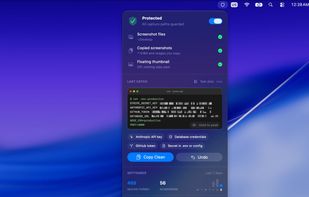
The menu bar panel shows what's protected, the latest catch with its secrets covered, and this month's counts

Cost / License

  • Pay once
  • Proprietary

Application type

Platforms

  • Mac  Requires macOS 15 Sequoia or later
0likes
0articles
Save

Features

Properties

  1.  Privacy focused
  2.  Lightweight

Features

  1.  No Coding Required
  2.  OCR
  3.  Dark Mode
  4.  Ad-free
  5.  No registration required
  6.  No Tracking
  7.  Works Offline
  8.  Data Protection
  9.  Sits in the menu bar

Redact Guard News & Activities

Highlights All activities

Recent activities

Redact Guard information

  • Developed by

    SG flagDuc Trung Mai
  • Licensing

    Proprietary and Commercial product.
  • Pricing

    One time purchase (perpetual license) that costs $19.
  • Alternatives

    6 alternatives listed
  • Badge

    Get an embeddable badge for Redact Guard
  • Supported Languages

    • English
    • Vietnamese
    • Chinese
    • Japanese
    • German
    • French
    • Portuguese
Redact Guard was added to AlternativeTo by Trung Duc Mai on and this page was last updated .

No comments or reviews, maybe you want to be first?

Official Links

What is Redact Guard?

Redact Guard runs quietly in the Mac menu bar and checks each new screenshot and each image you copy. If it spots something that shouldn't be shared, such as an API key in a terminal, a password in a settings page or a card number on a checkout form, it covers it straight away. The screenshot file and the clipboard both end up with the clean version, so what you paste into Slack, email, a GitHub issue or an AI chat is already safe.

It watches the screenshot folder, Downloads and any folders you add, and it also handles captures that go straight to the clipboard with Control-Shift-Command-4. More than 35 detectors are built in, covering keys and tokens from common cloud and AI services, private keys, database connection strings, .env values, card numbers, IBANs, email addresses and phone numbers. You can add your own rules in plain words or with regular expressions.

Redactions can't be reversed: every style starts with a solid fill, and the Blur and Mosaic looks are drawn from generated text rather than the real pixels. Originals are kept in a private Journal for 24 hours so a redaction can be undone. All text recognition happens on the Mac, nothing is uploaded, and no account is needed.
