Quick Search File is a fast file search utility for Mac. You choose the folders to search, the app builds a local index, and you find files by file name, folder name, extension, or any combination of the three. No sign-in or registration required. Available in English, 日本語, and 繁體中文.
It is built for people who manage large folders, project archives, research documents, drawings, invoices, contracts, and cloud-synced files. Unlike Spotlight, it searches only the folders you pick and only file and folder names, so results are not mixed with apps, web suggestions, or document contents.
[Key Features]
-
Quick Search Panel from Any App
Press ⌥⌘S anywhere, or click the menu bar icon, to search as you type without opening the main window. Open a file with Return, reveal it in Finder, or copy its path. The shortcut can be changed, and the app can start in the menu bar at login.
-
Multi-Keyword File Name Search
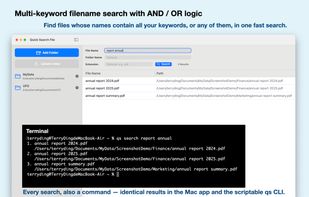
Search with one or more terms. AND matching is the default, and OR matching is available for broader results.
-
Folder Name Filtering
Filter by the folder a file lives in, including ancestor folders at any depth.
-
Extension Search
Search by file type, such as pdf, dwg, xlsx, jpg, and png.
-
Layered Search Filters
Combine file name, folder name, and extension filters to isolate the right file among tens of thousands of indexed items.
-
Local and Cloud-Synced Folders
Index folders on your Mac and any Finder-accessible cloud folders, such as OneDrive, Google Drive, Dropbox, and iCloud Drive.
-
Index That Keeps Up with Your Files
The app watches indexed folders and notices when files are added, deleted, renamed, or changed. Pro can update the index automatically.
-
Recent Files
Optionally show your most recently modified files when the search field is empty.
-
Clear Results
Every result shows the file name and full path. Adjust the result text size, open the file, reveal it in Finder, or choose which app opens it.
-
Command Line Tool (Pro)
The qs command uses the same local index as the app and works in Terminal, shell scripts, Shortcuts, and AI-assisted workflows. Output can be plain text, file paths only, or JSON. The quick search panel accepts the same options, such as --ext pdf and --folder finance.
[Plans]
Basic is free and supports up to 3 folders, file name search with an extension and folder filter, the quick search panel, recent files, and manual index updates. Pro adds more folders, multiple keywords with AND/OR matching, extension-only search, the command line tool, and automatic index updates. Pro is available as a monthly or yearly subscription, or as a one-time lifetime purchase.
Requires macOS 13 or later.







 TerryTing991 added Quick Search File as alternative to Spotlight, Alfred, EasyFind, Find Any File and 3 more


No comments or reviews, maybe you want to be first?