Quick Data Insights icon

Quick Data Insights

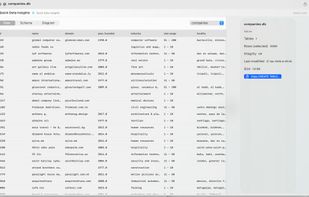
Stop launching heavy IDEs just to check a schema. Quick Data Insights extends macOS QuickLook to give you an instant preview of your data files directly in Finder. Hit the spacebar and get the info you need in milliseconds.
Quick Data Insights screenshot 1

Cost / License

  • Pay once
  • Proprietary

Platforms

  • Mac
Quick Data Insights screenshot 1
Quick Data Insights screenshot 2
+4
Quick Data Insights screenshot 3
0likes
0comments
0alternatives
0articles

Features

  1.  Ad-free
  2.  No Tracking
  3.  No registration required
  4.  SQLite

Quick Data Insights News & Activities

Highlights All activities

Recent activities

Quick Data Insights information

  • Developed by

    Moustafa Elsayed
  • Licensing

    Proprietary and Commercial product.
  • Pricing

    One time purchase (perpetual license) that costs $5.
  • Alternatives

    0 alternatives listed
  • Supported Languages

    • English

AlternativeTo Categories

DevelopmentEducation & Reference
Quick Data Insights was added to AlternativeTo by a2ra-ms on and this page was last updated .
No comments or reviews, maybe you want to be first?

What is Quick Data Insights?

Stop launching heavy IDEs just to check a schema. Quick Data Insights extends macOS QuickLook to give you an instant preview of your data files directly in Finder. Hit the spacebar and get the info you need in milliseconds.

Supported Formats:

  • Columnar Data: Parquet
  • Databases: SQLite (.db, .sqlite)
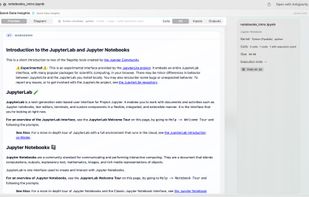
  • Notebooks: Jupyter (.ipynb)

Key Features for Power Users:

Instant Data Preview: View the first 100 rows of any supported file without loading the entire dataset into memory.

Schema Insights: Visualize table structures and relationships instantly.

One-Click SQL Export: Copy the CREATE TABLE statement directly to your clipboard for quick migration or documentation.

Jupyter Rendering: View notebooks as clean, rendered documents instead of raw JSON.

Code Extraction: Copy the logic out of a notebook and into a Python script with a single click.

Why it belongs in your workflow: If you deal with data, you know the friction of "just checking one thing." Quick Data Insights removes that friction by making data files as easy to preview as a PDF or an image. No more waiting for "Loading..." bars.

Official Links