Mark up site photos, highlight defects, sketch areas and record observations. Whether you’re documenting a project, explaining work to a contractor or adding detail to a technical report, QuantaImages helps you show exactly what you mean.
ANNOTATE YOUR PHOTOS
• Take a photo or choose one from your library.
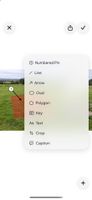
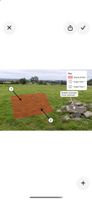
• Add arrows, lines, ovals and editable polygons.
• Add text with different fonts, sizes and light or dark backgrounds.
• Choose colours, line weights, dashed lines and fill patterns.
• Pinch to zoom for precise editing.
NUMBER AND EXPLAIN
• Add numbered pins to identify locations or observations.
• Give each pin a description.
• Create a key for your shapes, patterns, lines and pins.
• Edit the key’s title, labels and size, then drag it into position.
SAVE, EDIT AND SHARE
• Save projects on your device and return to edit them later.
• Keep annotations editable after saving.
• Add a caption beneath your image.
• Share a finished image through email, messaging and other supported apps.
QuantaImages is useful for engineers, consultants, contractors, property professionals and anyone who needs to communicate clearly with photos.
No account required. Create and edit projects offline.
- Geotechnical: trial pit logs, soil profiles, auger holes, borehole locations
- Wastewater: disposal fields, septic layouts, soakage areas
- Construction: defect reports, snag lists, punch lists, site observations
- Property: building inspections, maintenance reports, condition surveys
- Drainage: stormwater layouts, pipe routes, drainage defects
- Structural: crack mapping, concrete damage, repair locations
- Landscaping: planting plans, garden layouts, irrigation routes
- Safety: hazard identification, incident photos, site hazards
- Trades: job photos, scope of works, repair instructions
From the makers of QuantaDocs, the technical report authoring platform.











 Quanta_Images added Quanta Images as alternative to Annotable, AnnotateUp, ImageMarkup - Annotate images and PDF and Annotate.net

 Jump Assembly Limited


No comments or reviews, maybe you want to be first?