

Pro Photo Sorter icon

Pro Photo Sorter

Offline photo organizer for Windows. Nested tag folders, side-by-side compare, built-in editor, Lightroom-compatible XMP sidecars. $29 once.
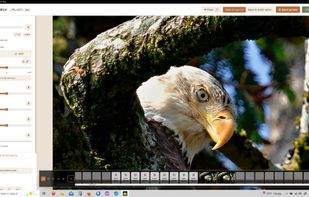
View of Image Editor window

Cost / License

  • Pay once
  • Proprietary

Application type

Platforms

  • Windows
0likes
0articles
Save

Features

  1.  Batch Rename Files
  2.  Live Preview
  3.  Non Destructive Editing
  4.  Ad-free
  5.  Built-in viewer
  6.  Works Offline
  7.  No Tracking
  8.  Dark Mode
  9.  File Tagging
  10.  No registration required
  11.  Batch Editing
  12.  Batch processing
  13.  Watermark images
  14.  No Subscription
  15.  Side-by-Side Comparison
  16.  Offline

Pro Photo Sorter News & Activities

Highlights All activities

Recent activities

Pro Photo Sorter information

  • Developed by

    US flagKurtis Morin
  • Licensing

    Proprietary and Commercial product.
  • Pricing

    One time purchase (perpetual license) that costs $29.
  • Alternatives

    16 alternatives listed
  • Badge

    Get an embeddable badge for Pro Photo Sorter
  • Supported Languages

    • English

AlternativeTo Categories

Photos & Graphics, File Management
Pro Photo Sorter was added to AlternativeTo by Kurtis Morin on and this page was last updated .

No comments or reviews, maybe you want to be first?

What is Pro Photo Sorter?

Pro Photo Sorter is a one-time-purchase Windows desktop app for culling and organizing thousands of photos with no internet connection.

Point it at any folder (SD card, external drive, NAS), drop tags onto a photo, press S. The photo lands in the right folder with the right filename — the destination path is built from the tags you applied, so nothing is typed by hand. Every stored photo gets an Adobe-standard .xmp sidecar with your star rating and keywords, so Lightroom, Bridge and Photo Mechanic pick up the finished work on import.

Features: unlimited nested categories (Sports › Baseball › Team › Player), ×2/×3 side-by-side compare with independent zoom, 1–5 star ratings, Cull mode, batch tag/store/move, built-in editor (auto-enhance, crop, rotate, straighten, sharpen) that keeps your tags on the edited copy, print-ready resize (4×6 to 16×20 at 300 DPI) with optional watermark, contact-sheet PDF, photo search, multi-source workflow, six starter tag packs and icon packs.

100% offline: one license check on activation, then it never connects. No account, no cloud, no telemetry. Free full-featured trial (stored photos carry a small watermark until a key is entered).
