


Foobnix PDF Reader
2 likes
Book and Document Reader with PDF and DjVu support for comfortable reading. If you are looking for a good PDF reader, stop here, you have found it. It does what you expect it to do. You can easily lay down and read PDF books and documents with this app. The amazing enhancement d.
 EU
EU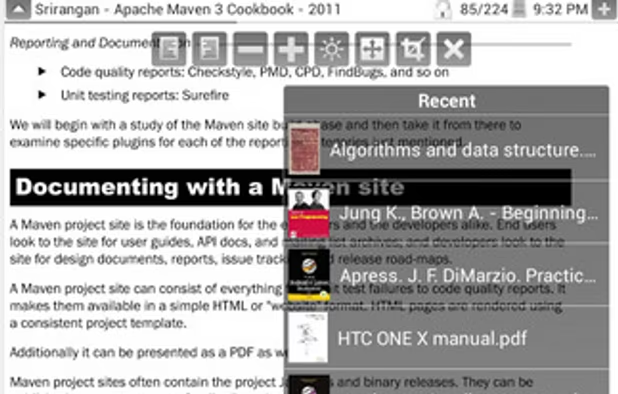

Features
- Dark Mode
- Integrated Search
Tags
Foobnix PDF Reader News & Activities
Highlights All activities
Recent activities
No activities found.


Foobnix PDF Reader information
Developed by
 Ivan Ivanenko
 Licensing
Proprietary and Freemium product.Pricing
free version with limited functionality.Alternatives
51 alternatives listedSupported Languages
- English
AlternativeTo Category
Office & Productivity


No comments or reviews, maybe you want to be first?
What is Foobnix PDF Reader?
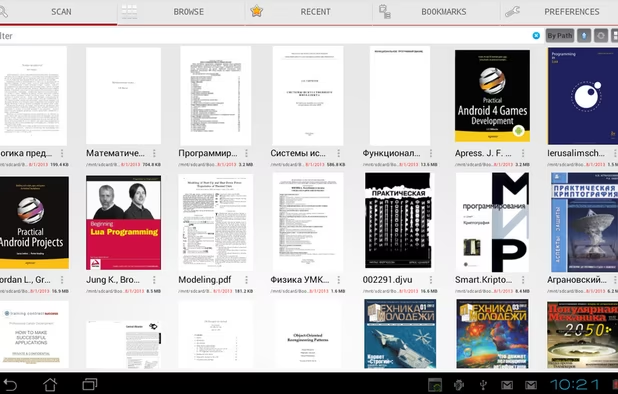
Book and Document Reader with PDF and DjVu support for comfortable reading. If you are looking for a good PDF reader, stop here, you have found it. It does what you expect it to do. You can easily lay down and read PDF books and documents with this app. The amazing enhancement dims your screen in some way that it doesn't hurt your eyes. Easy to set and keep scrolling. The best functional from all readers.
Functional:
- Read mode and control mode (single tap to switch)
- Fixate pages by width, saved on scroll
- Search in books
- Table of content
- Night Mode
- Search ALL books (PDF, DjVu) on device
- Next Page or scroll pages by tap screen
- Full screen mode
- Support e-reader keys like Nook, Kindle, Sony
- File navigation
- Recent Books
- Light and black theme
- Screen orientation: Portrait, Landscape, Automatic
- Text Bookmarks for page
- Links History, back to page
- Crop borders
- Automatic Scroll
- Swipe pages in lock mode
- Support Intel Atom x86 CPU
- Book and Page Thumbnails
- Recent books widget
- Send, Share documents and bookmarks
- Import, Export Settings
- Configurable search directories
- Samsung multi-window mode support
PRO Functional:
- No Ads, No Internet permission
- Support password protected PDF Files
- Filter Search result
- Sort search result by Name, Path, Size (Ascending, Descending)
