

PRISCA AI
The analytics and ML platform for individuals and businesses. Clean, enrich, visualize and predict - in minutes, no code required.
Cost / License
- Freemium (Subscription)
- Proprietary
Platforms
- Online
- Software as a Service (SaaS)
Features
Properties
- Privacy focused
- Lightweight
- AI-Powered
Features
- No Coding Required
- Real time collaboration
- Ad-free
- Import CSV Data
- Dashboard
- Data visualization
PRISCA AI News & Activities
Recent activities
PRISCA AI information
What is PRISCA AI?
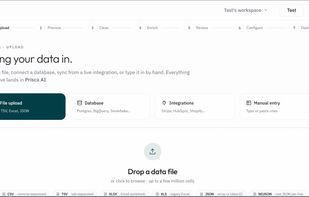
Prisca AI is an analytics and ML Platform for Individuals and Businesses. Stage 1 (Upload Stage): Users upload their data, connect to database or integrations like Shopify, or type in their data manually Stage 2 (Preview Stage): Upon upload, users get an instant preview of their data Stage 3 (Cleaning Stage): Prisca AI automatically detects data type and selects the appropriate cleaning strategy for each column. Users are also permitted to change column names and as well accept, reject or edit Prisca's recommendations. Stage 4 (Enrichment Stage): Prisca AI reads your data and intelligently suggests columns/data needed, thus enriching your data. For example, it intelligently extracts year, month, and quarters from a data column. Users can also ask Prisca AI in natural language if they want to add a new feature to the data. Prisca writes out the formula and adds it. Stage 5 (Review Stage): The user reviews the data and ensure everything is at the right place before proceeding to the next step Stage 6 (Configuration Stage): Here, Prisca AI chooses color themes, filter options, KPI cards and design, chart type and designs as well as color themes. The user can decide to configure their dashboard the way they'd want it to look, edit or accept Prisca's suggestions. Users can further select the filters they want. Stage 7 (Dashboard): Changes made in the configuration stage is effected in the main dashboard
Here, the cleaned data is visible and can be exported via CSV or XLSX Prisca AI also has a guided machine learning studio for prediction and live testing. Analysis and Insight reports are auto generated and downloaded as a PDF report or a slide deck.


