




PriceBuddy
6 likes
PriceBuddy is an open source, self-hostable, web application that allows users to compare prices of products from different online retailers. Users can search for a product and view the prices of that product from different online retailers.
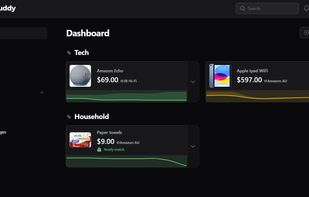

Cost / License
- Free
- Open Source
Application typeApplication types
Since
- Since 2025
Releases
- 17 releases last year17 last year
GitHub
- GitHub stars: 1.5k


Features
Highlights All activities
PriceBuddy News & Activities
Recent activities
 restockbuddy added PriceBuddy as alternative to Restock Buddy
- Priproven-com liked PriceBuddy
 Mauricio B. Holguin added PriceBuddy as alternative to PriceProven Price History
- humble-advisor liked PriceBuddy
 KeebRadar added PriceBuddy as alternative to KeebRadar
- mrcyodev liked PriceBuddy
 salert added PriceBuddy as alternative to Salert
 Paul added PriceBuddy as alternative to SmartTracker
 Yaya Apps added PriceBuddy as alternative to PriceWatchPro
- official-lil-homie liked PriceBuddy


Developed by
Jeremy GrahamLicensing
Open Source and Free product.Written in
Alternatives
37 alternatives listedBadge
Get an embeddable badge for PriceBuddySupported Languages

AlternativeTo Category
Business & CommerceGitHub repository
- 1,533 Stars
- 103 Forks
- 93 Open Issues
- Updated


No comments or reviews, maybe you want to be first?