
Presio icon
Presio icon

Presio

Present PDFs from your browser. Including speaker notes, mp4/YouTube/Vimeo support and more! Presentations stay on your machine unless explicitly shared!.
Presio screenshot 1

Cost / License

  • Free
  • Open Source (MIT)

Platforms

  • Online
0likes
0articles

Features

  1.  PDF annotation
  2. LaTeX icon  Support for LaTeX

Presio News & Activities

Highlights All activities

Recent activities

Presio information

AlternativeTo Category

Office & Productivity

GitHub repository

  •  24 Stars
  •  3 Forks
  •  9 Open Issues
  •   Updated  
View on GitHub
Presio was added to AlternativeTo by Benedict-Armstrong on and this page was last updated .
No comments or reviews, maybe you want to be first?

Official Links

What is Presio?

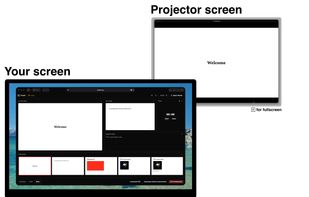
Presio is a browser-based presenter for PDF slideshows. Open a PDF and you get a controller view with slide navigation, speaker notes, and embedded media, plus a separate viewer window that mirrors whatever the controller shows. Put the viewer on the projector or external display and keep the controller on your laptop, just like a traditional presenter view. Presio is local by default. Your PDF stays in your browser and nothing is uploaded unless you choose to sync. Local decks work offline, and recent presentations stay available on the home page, so you can reopen them quickly. When you want to present across devices, log in and start a live session. Presio gives you a six-character session code that viewers can use to join from any device with a browser, with no app install needed. This is useful for remote audiences, hybrid meetings, or following along on a phone or tablet. Because Presio works with plain PDFs, it fits any workflow that produces them: LaTeX Beamer, Typst, Keynote, PowerPoint, Google Slides, Canva, or Markdown-based tools. A built-in checker validates the speaker notes and media attached to a PDF before you present. Presio is also built to be agent-friendly. Every page has a Markdown mirror, and the site offers an llms.txt file, an API reference, an OpenAPI spec, and an MCP server, so AI agents and scripts can interact with it programmatically.
