
PomoPlan icon
PomoPlan icon

PomoPlan

PomoPlan combines a powerful Pomodoro timer, a full-featured task manager and a habit tracker in a single offline-first Android app. Stop juggling five different apps — focus, plan and build momentum in one place.
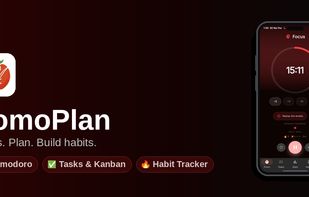
PomoPlan screenshot 1

Cost / License

  • Freemium (Pay once or Subscription)
  • Proprietary

Platforms

  • Android
  • Android Tablet
0likes
0comments
0articles

Features

  1.  Support for MarkDown
  2.  Gamification
  3.  Pomodoro Timer
  4.  Calendar Integration
  5.  No registration required
  6.  Kanban Board
  7. Google Calendar icon  Sync with Google Calendar
  8.  Reminders
  9.  Goal Tracking
  10.  Dark Mode
  11.  Subtasks
  12.  Task Time Tracking
  13.  No Coding Required
  14.  No Tracking
  15.  Recurring Tasks
  16.  Widgets
  17.  Habit Tracker
  18.  Sync with Google Drive
  19.  Offline

PomoPlan News & Activities

Highlights All activities

Recent activities

PomoPlan information

  • Developed by

    TR flagOdak Studio
  • Licensing

    Proprietary and Freemium product.
  • Pricing

    One time purchase that costs $20, and / or subscription ranging between $1 and $8 per month + free version with limited functionality.
  • Alternatives

    2 alternatives listed
  • Supported Languages

    • English
    • Arabic
    • Azerbaijani
    • Bulgarian
    • Catalan; Valencian
    • Chinese
    • Danish
    • German
    • Hindi
    • Italian
    • Greek
    • Persian
    • Ukrainian
    • Portuguese
    • Spanish
    • Russian

AlternativeTo Categories

Office & ProductivitySport & Health

Popular alternatives

View all
PomoPlan was added to AlternativeTo by bunyamintamar on and this page was last updated .
No comments or reviews, maybe you want to be first?

What is PomoPlan?

PomoPlan combines a powerful Pomodoro timer, a full-featured task manager and a habit tracker in a single offline-first Android app. Stop juggling five different apps — focus, plan and build momentum in one place.

POMODORO TIMER

  • Customizable focus, short break and long break durations
  • Floating Picture-in-Picture timer that stays on top of any app
  • Live notification controls: pause, skip, reset without unlocking
  • Accurate background timer with screen wake lock
  • Automatically tracks completed Pomodoros per task
  • Quick Start home-screen widget to start a session in one tap

TASK MANAGER More than a to-do list — four views to match how you think:

  • Kanban Board: move tasks through To Do / In Progress / Done
  • Eisenhower Matrix: prioritize by urgency and importance
  • Waterfall View: plan tasks with dependencies
  • Calendar View: see all your deadlines at a glance Plus: subtasks, recurring tasks, priority tags, project lists, smart filters (Today / This Week / Overdue / All), bulk actions, full-text search and natural-language input ("meeting tomorrow 3pm").

HABIT TRACKER

  • Daily, weekday, weekend or custom schedules
  • 12-week grid and 30-day consistency chart
  • Current streak, best streak and total completions

STATISTICS & INSIGHTS

  • Daily, weekly, monthly and yearly productivity reports
  • Focus heatmap to spot your most productive hours
  • Per-task session breakdowns and annual trend view

SYNC, WIDGETS & MORE

  • Google Drive cloud backup with one-tap restore
  • Google Calendar two-way integration
  • 5 home-screen widgets: Tasks, Calendar, Habits, Month, Quick Start timer
  • Works fully offline — no account required
  • Available in 87 languages
  • Light & Dark themes
  • Gamification: XP, levels and milestones

PREMIUM 14-day free trial unlocks Google Drive sync, all home-screen widgets and a completely ad-free experience. No commitment.

PRIVACY PomoPlan is offline-first. Your tasks, habits and sessions stay on your device unless you explicitly enable Google Drive backup. No tracking, no account required.

PomoPlan Videos

Official Links

