
Pomelo by Leonardo Pierini icon

Pomelo by Leonardo Pierini

 Like

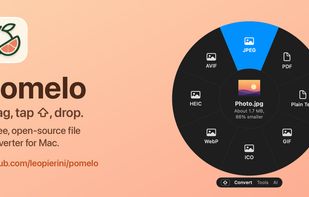
Native Mac app that converts and edits files where you drag them: start a drag in Finder, tap Shift, drop on what they should become. Free, open source, offline.
Pomelo by Leonardo Pierini screenshot 1

Cost / License

  • Free
  • Open Source (MIT)

Application type

Since

  • New

Updated

  • Updated Nov 2026

Platforms

  • Mac
0likes
0articles
Save

Features

Properties

Features

Highlights All activities

Pomelo by Leonardo Pierini News & Activities

Recent activities

Pomelo by Leonardo Pierini information

AlternativeTo Category

Audio & Music

GitHub repository

  •  1 Star
  •  0 Forks
  •  1 Open Issue
  •   Updated  
View on GitHub
Pomelo by Leonardo Pierini was added to AlternativeTo by leopierini on and this page was last updated .

No comments or reviews, maybe you want to be first?

Official Links

What is Pomelo by Leonardo Pierini?

Pomelo is a free, open-source native Mac app (it lives in the menu bar, not in a browser) that converts files right where you drag them. Start dragging files in Finder, tap Shift, and a wheel opens at your cursor with everything those files can become. Drop them on a slice and the new file appears next to the original, which is never modified.

It converts 50+ formats: images (HEIC, JPEG, PNG, WebP, AVIF), video, audio, PDF, Word, Markdown, Excel and CSV, subtitles and archives, planning a route through several steps when there is no direct one.

Editors open at the drop point: Trim, Split, Crop, Resize, Rotate, Compress to size and Redact, which finds faces, email addresses and text. On-device tools built on Apple's frameworks remove backgrounds, crop smartly, straighten documents and find duplicates; on macOS 26 they also transcribe, make subtitles, translate and turn PDFs into Word documents.

Everything runs on your Mac: no account, no uploads, no telemetry, and the gesture needs no special permissions. It also has a Shelf, a wheel you can customize per file type, Shortcuts actions, a Finder Quick Action and watch folders.

Requires macOS 14 or later, on Apple silicon or Intel.