Pockli: PDF Scan & Organize icon

Pockli: PDF Scan & Organize

The document scanner for iPhone that gives your important documents a proper home.
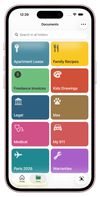
Organize documents into color-coded folders — each one with its own icon and purpose.

Cost / License

  • Freemium (Pay once or Subscription)
  • Proprietary

Application type

Platforms

  • iPhone
0likes
0comments
0articles

Features

Properties

  1.  Privacy focused
  2.  Lightweight

Features

  1.  Dark Mode
  2.  No registration required
  3.  OCR
  4.  Works Offline
  5.  Full-Text Search
  6.  File Tagging
  7.  Ad-free
  8.  Portable
  9.  Sign PDF files
  10.  Mobile Scanner
  11.  No Tracking
  12.  Built-in viewer
  13.  PDF annotation
  14.  Cloud Sync
  15.  Scanner
  16.  Scan documents

Pockli: PDF Scan & Organize News & Activities

Highlights All activities

Recent activities

Pockli: PDF Scan & Organize information

  • Developed by

    Pockli
  • Licensing

    Proprietary and Freemium product.
  • Pricing

    One time purchase that costs $79, and / or subscription that costs $4 per month + free version with limited functionality.
  • Alternatives

    24 alternatives listed
  • Supported Languages

    • English

AlternativeTo Categories

Office & ProductivityPhotos & GraphicsFile Management

Apple AppStore

  •   Updated 
  •   0 avg rating
View in AppStore
Pockli: PDF Scan & Organize was added to AlternativeTo by Pockli on and this page was last updated .
No comments or reviews, maybe you want to be first?

What is Pockli: PDF Scan & Organize?

We built Pockli because we had the same problem you probably have.

Important documents kept piling up — insurance cards, school forms, medical records — and we'd either take a quick photo that disappeared into the camera roll, or scan it into a folder full of files named Scan_001.pdf. Too many steps to rename, sort, and organize. So we'd postpone it. And months later, when we actually needed that document, it was gone.

Pockli is a document scanner for iPhone built around one idea: your documents should be named, sorted, and findable from the moment you scan them.

You pick a folder, scan into it, and the folder takes care of the rest — naming the file, setting the quality, running OCR so every word inside becomes searchable. Your Car folder names things one way. Your Medical folder names things another. You set it up once and never think about it again.

Need that insurance card at the mechanic? Search for it. The document comes up instantly — by what's written inside it, not just the filename.

Everything stays on your device and your iCloud. No accounts, no cloud servers, no data collection.

Free to start. Pro unlocks full-text search, folder rules, and unlimited folders with a 7-day free trial.

Official Links