Pocketry is a clipboard manager that lives in your Mac's menu bar. It remembers what you copy, keeps it encrypted on your Mac (AES-256, key in your Keychain), and brings it back with one shortcut. Pocketry never uploads your clipboard, and there is no account or analytics inside the app.
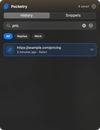
Find anything: searchable history for text, links, images and files, with pins and collections. Search forgives typos, understands plain phrases like "links from Safari last week", and can find entries by meaning, so "stuff to take on the trip" finds your packing list. Pictures are searchable by the text in them and by what they show. Find by meaning runs on your Mac with a small model built into the app.
Screenshot to text reads text from anything on screen, including video and PDFs you can't select. Afterwards it can explain an error message with Apple's on-device model, or translate the text with Apple's translation panel.
Paste faster: snippets expand as you type, a paste stack pastes several copies in order, and "Paste as…" turns a copy into UPPERCASE, camelCase, a quoted reply, a Markdown link, escaped JSON, a CSV or Markdown table, sorted lines, or a link with the tracking removed. Snippets and pins can show up in Spotlight, and there's a Shortcuts action.
Privacy: it ignores password managers, hides API keys, tokens and card numbers, then deletes them after two minutes. Safe Paste swaps the emails, numbers and keys it recognises for placeholders when you paste into an AI app and puts the real ones back when you copy the answer. It is off until you turn it on, and it does not find street addresses or free-form secrets. Paste Guard warns before you paste a risky command into Terminal. Optional Touch ID lock and auto-delete. Deleted something by mistake? Undo brings it back within 15 seconds.
On-device AI actions (summarize, clean up, translate, explain) use Apple's on-device model and need macOS 26 with Apple Intelligence. Bring your history over from another clipboard app.
For Apple silicon Macs, macOS 14 or later. 14-day free trial. One-time purchase, no subscription. Not on the Mac App Store.








 TrueHeading


No comments or reviews, maybe you want to be first?