
PMVW icon
PMVW icon

PMVW

PMVW (Poor Man's Video Wall) turns a single Apple TV into a 4-tile video wall. Each tile can be a different source, so you can watch four things at once on one screen.
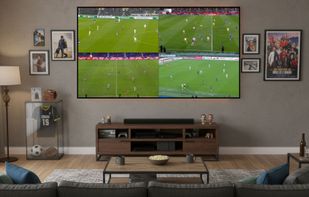
PMVW screenshot 1

Cost / License

  • Subscription
  • Proprietary

Platforms

  • Apple TV  Requires the free PMVW companion app running on a Mac or Windows PC on the same local network.
  • Windows  This is the free companion app that captures and streams sources to the Apple TV / iPad receiver — not the viewer itself.
  • Mac  This is the free companion app that captures and streams sources to the Apple TV / iPad receiver — not the viewer itself.
  • iPad
0likes
0comments
0articles

Features

Properties

  1.  Privacy focused
  2.  Decentralized

Features

  1.  Watch Live TV
  2.  Picture in Picture
  3.  Ad-free
  4.  Multi-streaming
  5.  Screen Sharing
  6.  Works Offline
  7.  MultiView
  8.  Dashboard
  9.  Stream video to Apple TV
  10.  Live Streaming

PMVW News & Activities

Highlights All activities

Recent activities

PMVW information

  • Developed by

    TR flagPMVW
  • Licensing

    Proprietary and Commercial product.
  • Pricing

    Subscription ranging between $6 and $8 per month.
  • Alternatives

    37 alternatives listed
  • Supported Languages

    • English
PMVW was added to AlternativeTo by batuhanbayazit on and this page was last updated .
No comments or reviews, maybe you want to be first?

What is PMVW?

PMVW (Poor Man's Video Wall) turns a single Apple TV into a 4-tile video wall. Each tile can be a different source, so you can watch four things at once on one screen.

Unlike Apple's built-in Multiview — which only works with select Apple TV+ sports apps — PMVW works with any source:

  • Any browser tab or screen from a Mac or PC
  • USB HDMI capture cards (cable boxes, set-top boxes, NVRs)
  • RTSP security cameras
  • YouTube, HLS (.m3u8), and other live stream URLs

Common uses: watch four sports matches at once (any league, not just the ones Apple supports), display Grafana / Home Assistant dashboards on a wall-mounted TV, monitor multiple security cameras, or put an HDMI source on your Apple TV.

How it works: a free helper app runs on a Mac or PC on the same local network, and the Apple TV app finds it automatically (no IP addresses to type). Screen, HDMI and camera video stays on your local network via WebRTC — it doesn't go through a cloud server.

Requires an Apple TV plus the free helper app on a Mac or Windows PC on the same network. 7-day free trial, then from €5.99/month.

Official Links
