
Plume Launcher icon
Plume Launcher icon

Plume Launcher

Plume replaces the cluttered stock home screen with the two things you actually use: your apps and what you were watching. There are no ads, no sponsored rows, no account and no tracking, and it stays out of the way of the apps it launches.
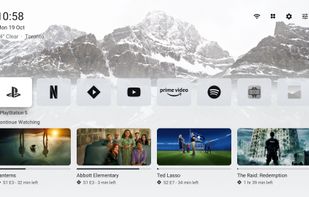
Plume Launcher screenshot 1

Cost / License

Platforms

  • Android TV
  • Google TV
0likes
0articles
Save

Features

Features

Highlights All activities

Plume Launcher News & Activities

Recent activities

Plume Launcher information

GitHub repository

  •  27 Stars
  •  2 Forks
  •  3 Open Issues
  •   Updated  
View on GitHub
Plume Launcher was added to AlternativeTo by Darlene Sonalder on and this page was last updated .

No comments or reviews, maybe you want to be first?

What is Plume Launcher?

Plume replaces the cluttered stock home screen with the two things you actually use: your apps and what you were watching. There are no ads, no sponsored rows, no account and no tracking, and it stays out of the way of the apps it launches.

Highlights

  • Tiny and fast. A 0.4 MB APK with no third-party libraries. It uses about 50–70 MB of RAM and has no extra background services.
  • Home button support on Google TV. The Home button opens Plume directly, even on devices where the system launcher can't be replaced. Holding Home still opens the Google TV dashboard.
  • Continue Watching. Resume shows and films from Android TV's Watch Next list and from apps that publish their own "Continue Watching" channel, such as Stremio.
  • Clean apps row. Monochrome logos (or the same logos in brand colour) in a single row, with names on focus, always or never. Rearrange it by holding OK, sort by most used, or hide apps you don't use (they stay in All apps).
  • HDMI inputs as apps. A console or set-top box that names itself over HDMI-CEC (for example "PlayStation 5") gets its own tile, which switches the TV to that input.
  • Light, dark or automatic theme, each with its own wallpaper. Add your own photos from your phone by scanning a QR code.
  • Optional Gallery screensaver. Public-domain landscape paintings in 16:9, downloaded only if you choose it.
  • Optional weather under the clock.
  • Updates itself. Plume checks GitHub once a day and installs new versions from its settings (from 1.2 on). The first update asks you to allow installs from Plume.
