Pixie Alternatives

Pixie is described as 'Small utility that can show you coordinates and color of any pixel on your screen in different formats (HEX, HTML, RGB, CMYK, HSV). It's staying on top, displays a color of that pixel under mouse cursor, the program can magnify that zone w/ hotkey' and is a Color Picker tool in the development category. There are more than 50 alternatives to Pixie for a variety of platforms, including Windows, Mac, Linux, Web-based and iPhone apps. The best Pixie alternative is ShareX, which is both free and Open Source. Other great apps like Pixie are PicPick, Realtime Colors, Just Color Picker and gpick.

Copy a direct link to this comment to your clipboard
Pixie alternatives page was last updated

Alternatives list

  1. GetColor! icon
     1 like
    Copy a direct link to this comment to your clipboard

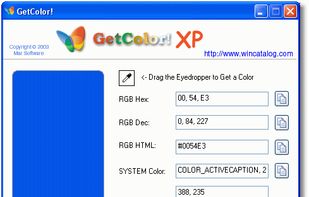
    GetColor! - Free Color Picker for Windows. GetColor! allows you to retrieve the color of any pixel on your desktop easily: just move the eyedropper tool into any place of your desktop and GetColor! will show you the color value!

    Cost / License

    • Free
    • Proprietary

    Application type

    Platforms

    • Windows
     
  2. Copy a direct link to this comment to your clipboard

    Aurora is a beautiful and easy to use color picker and dictionary app. It is as feature-rich as it is gorgeous.

    Cost / License

    • Pay once
    • Proprietary

    Application type

    Platforms

    • Mac
    • iPhone
    • iPad
    • Apple Watch
    • Apple Messages
     
  3. Copy a direct link to this comment to your clipboard

    Free Color Picker is a program that lets you capture the color of any pixel displayed on the screen. To capture a color, just move the cursor to the desired position and press the F4 key. The color below the cursor will be added to the color palette located in the right part of...

    Cost / License

    • Free
    • Open Source

    Application type

    Platforms

    • Windows
     
  4. gcolor2 icon
     23 likes
    Copy a direct link to this comment to your clipboard

    gcolor2 is a basic colourpicker utility that allows you to select any colour on your screen, and, well, grab it's colour. It also allows you to save the colour you create to a file, which shows up as a list in the application.

    Cost / License

    • Free
    • Open Source

    Application type

    Alerts

    • Discontinued

    Platforms

    • Linux
    • Xfce
     
  5. Pipette icon
     10 likes
    Copy a direct link to this comment to your clipboard

    With the pipette you are able to edit, convert and pick up colors from your screen. Pipette also supports a lot of standards or color models (RGB, CMY, CMYK, HSV, TColor and XYZ0). Color models are nothing but theoretical descriptions of colors using certain numeric values.

    Cost / License

    • Free Personal
    • Proprietary

    Application type

    Platforms

    • Windows
     
  6. Copy a direct link to this comment to your clipboard

    PickXColor is a browser-based tool that enables users to select any color displayed on their screen without the need for additional software installations. It operates directly within web browsers such as Chrome, Edge, or Opera, making it convenient for designers, developers...

    Cost / License

    • Free
    • Proprietary

    Application type

    Platforms

    • Online
     
  7. Copy a direct link to this comment to your clipboard

    Plastiliq PixelPicker is a useful color picker tool that gets the pixels color under your mouse pointer on the screen and translates it into a number of different color formats.

    Cost / License

    • Free
    • Proprietary

    Application type

    Platforms

    • Windows
     
  8. CPick icon
     5 likes
    Copy a direct link to this comment to your clipboard

    Program to get colors from your screen with the build in magnifier. Zoom 1 to 10. Modify colors with the RGB or HSV slide bars. Copy the color to the clipboard as Hex, Decimal, RGB or HSV value. Direct changing the RGB and HSV values.

    Cost / License

    • Free
    • Proprietary

    Application type

    Platforms

    • Windows
     
  9. ColorSnapper icon
     2 likes
    Copy a direct link to this comment to your clipboard

    ColorSnapper — the missing color picker for OS X.

    ColorSnapper is an easy-to-use tool for quickly finding out the color of any pixel on the screen. It is activated via a configurable system-wide hotkey, giving you a magnifying loupe to easily pick the pixel you need. The resulti.

    Cost / License

    • Pay once
    • Proprietary

    Application type

    Platforms

    • Mac
     
  10. ColorGrab icon
     3 likes
    Copy a direct link to this comment to your clipboard

    A cross-platform color picker. Select any color from screen, manage palettes, convert colors, etc.

    Cost / License

    • Free
    • Open Source

    Application type

    Alerts

    • Discontinued

    Platforms

    • Windows
    • Linux
    • BSD
     
  11. Pikka icon
     Like
    Copy a direct link to this comment to your clipboard

    Pikka - Color Picker is a easy to use color picker for Cocoa developers and designers, that works well with multiple screens.

    Cost / License

    • Pay once
    • Proprietary

    Application type

    Platforms

    • Mac
     
  12. Copy a direct link to this comment to your clipboard

    imagecolorpicker.com aims to find a color code on an image faster than launching a software on your computer. The color picker also offers more information about the color.

    Cost / License

    • Free
    • Proprietary

    Application type

    Platforms

    • Online
    • Software as a Service (SaaS)
     
You are at page 3 of Pixie alternatives