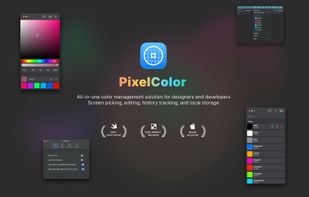
PixelColor icon
PixelColor icon

PixelColor

Professional Color Picker for macOS.

PixelColor screenshot 1

Cost / License

  • Pay once
  • Proprietary

Platforms

  • Mac  Universal Binary for Apple Silicon and Intel Macs.
1like
0comments
0articles

Features

Properties

  1.  Privacy focused
  2.  Lightweight

Features

  1.  No Tracking
  2.  No registration required
  3.  Live Preview
  4.  Works Offline
  5.  Hardware Accelerated
  6.  Ad-free
  7.  Dark Mode
  8.  Color Palette
  9.  Color Picker

PixelColor News & Activities

Highlights All activities

Recent activities

PixelColor information

  • Developed by

    CN flagTapfun Information Technology Co., Ltd.
  • Licensing

    Proprietary and Commercial product.
  • Pricing

    One time purchase (perpetual license) that costs $7.
  • Alternatives

    7 alternatives listed
  • Supported Languages

    • English
PixelColor was added to AlternativeTo by App TapFun on and this page was last updated .
No comments or reviews, maybe you want to be first?

What is PixelColor?

PixelColor - Your All-in-One Color Management Solution Pick, edit, save, and copy colors with ease. PixelColor is designed for designers and developers who need fast, accurate color management on macOS.

KEY FEATURES:

SCREEN COLOR PICKER

  • Pick any color from your screen with one click
  • Global hotkey support for instant color picking
  • Works anywhere on your display

MULTI-FORMAT COLOR EDITING

  • Three color models: RGB, HSB, and HSL
  • Edit colors with intuitive sliders
  • Direct input in HEX, rgb(), or hsl() formats
  • Automatic alpha transparency support (rgba, hsla, 8-digit HEX)

COLOR LIBRARY

  • Save favorite colors with custom names
  • Search by color name or value
  • Organize your color collection
  • Persistent storage using Core Data

QUICK ACCESS

  • Recent colors history (last 6 colors)
  • Menu bar integration for instant access
  • One-click copy to clipboard
  • Copy in HEX, RGB, or HSL format

GLOBAL SHORTCUTS

  • Customize keyboard shortcuts
  • Pick color from anywhere
  • Show/hide main panel
  • Show favorites panel

WHY PIXELCOLOR?

  • Native macOS app built with SwiftUI
  • Beautiful dark mode support
  • Works completely offline
  • No analytics, no tracking, no ads
  • Your data stays on your device
  • Universal binary (Intel + Apple Silicon)
  • Minimal resource usage

PERFECT FOR

  • Web developers copying CSS colors
  • UI/UX designers maintaining color palettes
  • Graphic artists organizing color schemes
  • Anyone needing quick color picking

Download PixelColor today and simplify your color workflow!

Official Links