pikapik icon
pikapik icon

pikapik

pikapik started with one wish: playing Minecraft on a Mac with Control working properly. Holding Control to sprint and pressing Space to jump also switches the input language, so the game kept freezing mid-run.
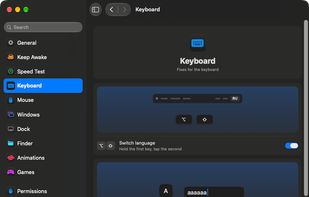
Everything in one place. Each tool has its own switch, and everything stays off until you turn it on.

Cost / License

  • Free
  • Open Source (MIT)

Platforms

  • Mac
Game Mode: play without interruptions. Spotlight, Mission Control and an accidental ⌘Q stay out of your game.
Keep Awake: your Mac stays awake for as long as you choose, from one second to a whole year.
+3
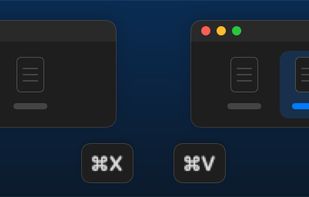
Finder: cut files with ⌘X and paste them with ⌘V to move them, no dragging needed.
Alternatives
1like
0alternatives
0articles
Save

Features

Properties

Features

Highlights All activities

pikapik News & Activities

Recent activities

  • Vladislav Pesotchi liked pikapik
  • Vladislav Pesotchi added pikapik

pikapik information

  • Developed by

    MD flagpikapik
  • Licensing

    Open Source (MIT) and Free product.
  • Written in

  • Alternatives

    0 alternatives listed
  • Badge

    Get an embeddable badge for pikapik
  • Supported Languages

    • English
    • Arabic
    • Czech
    • German
    • Spanish
    • French
    • Hindi
    • Indonesian
    • Italian
    • Japanese
    • Korean
    • Dutch
    • Polish
    • Romanian
    • Russian
    • Swedish
    • Thai
    • Turkish
    • Ukrainian
    • Vietnamese
    • Portuguese
    • Chinese

AlternativeTo Categories

OS & Utilities, Gaming Software

GitHub repository

  •  2 Stars
  •  0 Forks
  •  0 Open Issues
  •   Updated  
View on GitHub
pikapik was added to AlternativeTo by Vladislav Pesotchi on and this page was last updated .

No comments or reviews, maybe you want to be first?

What is pikapik?

pikapik started with one wish: playing Minecraft on a Mac with Control working properly. Holding Control to sprint and pressing Space to jump also switches the input language, so the game kept freezing mid-run. Today it is a free, open-source menu bar app with small comforts for games, keyboard, mouse, windows and Finder.

What it does:

  • Game Mode: add your games, and while you play, Spotlight, Siri, ⌘Tab and Mission Control don't pop up over the game, ⌘Q and ⌘W don't close it by accident, the pointer stays on the game screen, and the display stays on. Ctrl-click stays a click in games. Minecraft is recognized too.
  • Keep Awake: stops the Mac from sleeping for a time you choose, with display options and an option to work with the lid closed.
  • Keyboard: switch the input language with Option+Shift, repeat a held key instead of the accent menu, Home and End go to the start and end of a line.
  • Mouse: turn off pointer acceleration, scroll by lines, separate scroll direction for mouse and trackpad, side buttons go back and forward.
  • Windows: enlarge with the green button, protection for ⌘Q and ⌘W, quit an app when its last window closes.
  • Dock: click an app's icon in the Dock to hide the app.
  • Finder: New File from the right-click menu, Enter to open, ⌘X to cut, Delete to move to the Trash, Make a Smaller Copy, Convert To another format.
  • Speed Test: check your internet speed.

Everything is off until you turn it on. It doesn't record, store or send what you type or click; the only network request is the update check. 23 languages, light and dark themes, settings can be backed up to a file or synced through iCloud.