Photo2Vector icon
Photo2Vector icon

Photo2Vector

 Like

Prepares photographs for machines that cut and burn: upload a photo, get an SVG with closed, cuttable paths for laser engravers, CNC routers and vinyl cutters.
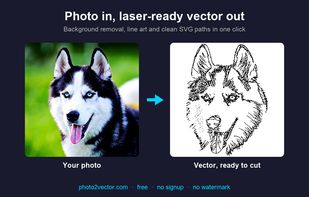
A photo turned into laser-ready vector line art with closed, cuttable paths

Cost / License

  • Freemium (Usage-based)
  • Proprietary

Application type

Since

  • Since 2025

Platforms

  • Online
0likes
0articles
Save

Features

Properties

Features

Highlights All activities

Photo2Vector News & Activities

Recent activities

Photo2Vector information

  • Developed by

    PL flagPhoto2Vector
  • First released

    2025
  • Licensing

    Proprietary and Freemium product.
  • Pricing

    Usage-based pricing (pay per credit or per use) + free version with limited functionality.
  • Alternatives

    5 alternatives listed
  • Badge

    Get an embeddable badge for Photo2Vector
  • Supported Languages

    • English

AlternativeTo Category

Photos & Graphics
Photo2Vector was added to AlternativeTo by user-8052 on and this page was last updated .

No comments or reviews, maybe you want to be first?

What is Photo2Vector?

Photo2Vector prepares photographs for machines that cut and burn. Upload an image and it returns an SVG with closed, cuttable paths that a laser engraver, CNC router, vinyl cutter or screen-printing setup can actually use.

Engraving a photo directly gives a muddy result, because a laser either fires or it does not. What the machine needs is line art, an outline or a clean silhouette, and drawing that by hand in Illustrator or Inkscape takes twenty minutes to an hour per image.

The converter runs a fixed pipeline on its own servers: background removal, line-art extraction, speckle removal and gap closing, skeletonisation, then curve-fitted vector tracing. Every stage is shown side by side and can be re-run with its own parameters, and a browser editor lets you paint over artefacts before export. Styles cover line art, outline, silhouette, stencil with bridges, halftone and printable coloring pages. Output is SVG, PNG or BMP, tested with LightBurn, xTool, Glowforge, EZCAD, Cricut and Silhouette.

The converter is free, with no watermark, no signup and no conversion limit. Uploads are deleted after 24 hours and are never used to train models.

One optional paid feature, AI line art, uses a generative model to redraw a portrait or pet photo as a hand-drawn engraving. Previews are free; a download costs $3.99, or as little as $0.50 a photo in a pack, with no subscription.

Photo2Vector Videos