Pen and Quiet is a distraction-free Markdown editor that runs entirely in your browser. There's nothing to install and no account to create, and your writing never goes to a server. Documents stay on your device.
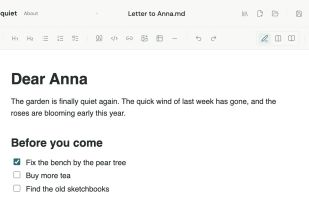
Write in rich text and get clean Markdown. It supports headings, lists, checklists, quotes, code, links, images and tables. You can switch between edit, split and reading views. Focus mode highlights the paragraph you're working on, and there's a dark theme for late nights.
Your files, your folder. In Chrome, Edge, Brave and Opera on desktop, you can connect a folder on your computer, such as your iCloud Drive, Dropbox or Proton Drive folder. Pen and Quiet lists the documents in it, opens them, and saves your changes automatically while you write. Your cloud provider handles syncing. If a file changed somewhere else, you choose which version to keep.
Version history built in. Versions are saved automatically as you write. You can add a note to a version, compare any two word by word, and restore an older one. The history is stored only in your browser.
Export anywhere. Save as Markdown, or export a PDF or a Word document (.docx). Both exports are built in your browser. Print just the document, without the app around it.
Quiet by design. No AI, no tracking unless you allow it, no login and no cloud lock-in. Opening .md, .markdown and .txt files, word counts, draft recovery and keyboard shortcuts are all there. It's just a calm place to write.







 Michiel-4862 added Pen and Quiet as alternative to Joplin, Zettlr, Simplenote, Typora and 47 more

No comments or reviews, maybe you want to be first?