PeakHour is a serious network monitor for macOS, built for everyone from the curious to the network engineer. Watch your connection, your router, and the devices on your network — all in real time.
Slow Zoom call? Bandwidth hog at large? Wondering what your ISP is actually delivering? PeakHour shows you exactly what's happening on your network, the moment it's happening.
KEY FEATURES
• AI Network Advisor (NEW)
On-device intelligence grades your connection with a letter score and explains what's going on in plain English. Powered by Apple Intelligence. Nothing ever leaves your Mac.
• Internet Dashboard
A complete real-time view of your network path, from your Mac to your router, ISP, and the wider internet. Latency, throughput, and connection health at a single glance.
• Wi-Fi Intelligence
See how good your Wi-Fi really is, wherever you are. PeakHour shows you when your signal is weak, when interference is slowing you down, and where in the house your Mac connects best — so you can stop guessing why video calls drop or downloads stall.
• Bandwidth & Latency Monitors
Dedicated real-time monitors for any UPnP- or SNMP-capable device on your network — routers, switches, NAS, and more — each with live sparkline charts. Watch traffic patterns develop second by second.
• Monitor Other Macs with PeakHour Enabler
Want to keep an eye on the family iMac or your office Mac mini? PeakHour Enabler is our free, open-source companion utility that turns any Mac into a monitorable target in two clicks. Run it on the Mac you want to watch, and PeakHour picks it up automatically.
• Speed Test + Responsiveness
Integrated speed tests pair classic download and upload numbers with the modern Responsiveness Per Minute (RPM) score, so you know your network feels fast, not just fast on paper.
• Always in Your Menu Bar
Live bandwidth, latency, and status right in your macOS menu bar, with a glanceable dropdown dashboard one click away.
• Instant Notifications
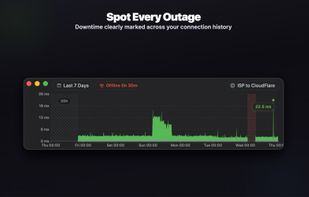
Know the second your connection drops, and the second it comes back. Outage and recovery alerts powered by a self-healing probe engine.
• ISP & Router Inspection
Deep visibility into your ISP — public IP, network operator, and geolocation — and your router's hardware, uptime, and live traffic counters. All without opening another app.
• History Charts
Beautiful, scrollable bandwidth and latency history with smooth curves, side-by-side download/upload views, and color-coded congestion. Spot patterns over hours, days, or weeks.
• Customize Everything
Polling intervals, alert thresholds, menu bar layout, notification rules, monitor cards. Make PeakHour fit how you work.







 EpaL added PeakHour as alternative to PeakHour 4, PingZilla, PingInfoView and Ping Monitor


No comments or reviews, maybe you want to be first?