PDFill Alternatives

PDFill is described as 'With PDFill you can create, fill, delete and submit PDF form fields; insert new formatted text, check, image, hyperlink, whiteout, highlight, drawing, comment and annotation anywhere in the document; save, print or email the filled and password-protected PDF; save and resume' and is a PDF Editor in the office & productivity category. There are more than 100 alternatives to PDFill for a variety of platforms, including Windows, Web-based, Mac, Linux and iPhone apps. The best PDFill alternative is DottedSign, which is free. Other great apps like PDFill are PDF Arranger, PDF-XChange Editor, PDF24 Creator and Stirling-PDF.

Copy a direct link to this comment to your clipboard
PDFill alternatives page was last updated

Alternatives list

  1. pdfly icon
     1 like
    Copy a direct link to this comment to your clipboard

    pdfly (say: PDF-li) is a pure-python CLI application for manipulating PDF files.

    Cost / License

    • Free
    • Open Source

    Platforms

    • Python
    • Mac
    • Linux
    • Windows
    • BSD
     
  2. anyPDF icon
     Like
    Copy a direct link to this comment to your clipboard

    Do you want to edit a pdf everywhere? No problem: anyPDF has your back anytime and anywhere – easy, flexible, and free!

    Cost / License

    • Free
    • Proprietary

    Application type

    Platforms

    • Windows
     
  3. Copy a direct link to this comment to your clipboard

    Elimisoft PDF Creator is a great way to help you create PDF from Word(.docx), PowerPoint(.pptx), Plain Text, RTFD, HTML, EPUB, and Image(.png, .gif, .tif, .jpeg, etc). It also keeps the origin formatting after creating!.

    Cost / License

    • Freemium (Pay once)
    • Proprietary

    Platforms

    • Mac
     
  4. Copy a direct link to this comment to your clipboard

    Aspose.Total Conversion is a free online document converter that completely supports conversion to/from many common word processing, spreadsheet, presentation, CAD drawings, images and other popular file formats.

    Cost / License

    • Free
    • Proprietary

    Platforms

    • Online
     
  5. PDF to X icon
     1 like
    Copy a direct link to this comment to your clipboard

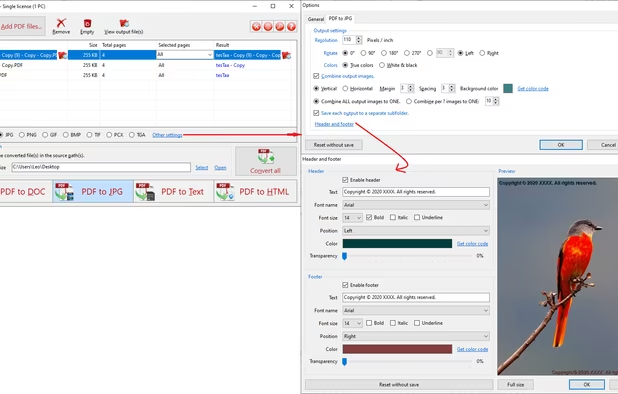
    PDF to X is used to convert PDF documents to Word (.doc)/WordPad (.rtf) documents, HTML web pages, JPG/PNG/BMP/TIF/GIF/PCX/TGA images and plain text files in batch mode. It works without Adobe Acrobat or Adobe Reader.

    Cost / License

    • Subscription
    • Proprietary

    Platforms

    • Windows
     
  6. Copy a direct link to this comment to your clipboard

    This program allows you to split PDF file onto several documents. You can also extract selected pages from original document, or remove specified pages. After PDF splitting, you are enabled to edit, modify and secure the PDF files.

    Cost / License

    • Free
    • Proprietary

    Platforms

    • Windows
     
  7. Copy a direct link to this comment to your clipboard

    Bookmark PDF is a free, browser-based tool designed to simplify the process of adding, editing, and organizing bookmarks in PDF files. Unlike traditional tools, Bookmark PDF operates entirely online, ensuring maximum privacy and security for your documents.

    51 Bookmark PDF alternatives

    Cost / License

    • Free
    • Proprietary

    Application type

    Platforms

    • Online
     
  8. Copy a direct link to this comment to your clipboard

    Text to PDF, scan QR & Barcode to PDF, excel to PDF. It’s easy to use and 100% free.

    This app is like a one-stop solution. Try it now!

    Cost / License

    • Free
    • Proprietary

    Platforms

    • Android
     
  9. PDFZorro icon
     1 like
    Copy a direct link to this comment to your clipboard

    Edit pdf online for free. Simple and easy to use.

    10 PDFZorro alternatives

    Cost / License

    • Free
    • Proprietary

    Application type

    Platforms

    • Online
     
  10. Copy a direct link to this comment to your clipboard

    PDF software that allows you to easily split and merge PDF files in just a few steps. This program allows you to merge unlimited number PDF documents as a single PDF file and also split a large PDF file into multiple smaller parts.

    Cost / License

    • Pay once
    • Proprietary

    Platforms

    • Windows
     
  11. Copy a direct link to this comment to your clipboard

    Are you looking for an easy way to manage your PDFs? Our tool makes it effortless to merge files and extract pages with just a few clicks.

    Cost / License

    • Freemium (Pay once)
    • Proprietary

    Platforms

    • Windows
     
  12. PDFTools icon
     5 likes
    Copy a direct link to this comment to your clipboard

    PDFTools is a PDF management application. It can encrypt, decrypt, join, split, stamp, create and rearrange a PDF file.

    Cost / License

    • Free
    • Proprietary

    Alerts

    • Discontinued

    Platforms

    • Windows
     
You are at page 8 of PDFill alternatives